


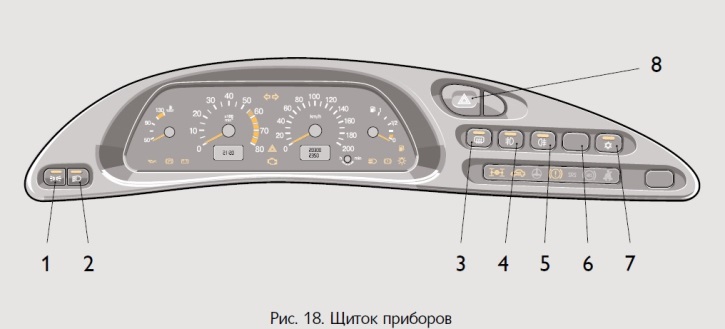
Figure 18 shows the placement of the pushbutton switches. When the external lighting is on, the key symbols are illuminated.
1. Side light switch. Side lights are turned on and off by successive pressing of the switch key. When side lights are turned on, the light indicator in the key itself lights up.
2. Headlight switch. Pressing the button turns on the headlights. The sidelight and headlight switches are combined into an "external lighting switch". A mechanical link eliminates the possibility of turning on the headlights without first turning on the sidelights and turning off the sidelights when the headlights are on.
3. Rear window and outside mirror heating switch. The rear window and outside mirror heating is switched on by pressing the switch button and switched off by pressing it again. The light indicator in the button itself signals that the heating is on.
4. Front fog light switch. Installed on cars with fog lights. Fog lights are turned on in conditions of limited visibility - snow, fog, etc. - by pressing the switch button with the parking lights on. When the switch button is pressed again, the fog lights and the light indicator in the button itself, warning about their inclusion, are turned off.
5. Rear fog light switch. Pressing the switch button turns on the rear fog lights and the indicator light in the button if the headlights are on. Pressing the switch button again turns off the fog lights and the indicator light. When the vehicle ignition is turned off, the rear fog lights turn off automatically.
6. Reserve.
7. Air conditioning switch. Installed on cars equipped with air conditioning. The air conditioning is turned on by pressing the switch button and turned off by pressing it again. The light indicator in the button itself signals that the air conditioning is on.
8. Hazard warning light switch. When the button is pressed, the flashing light of all direction indicators is turned on. When the button is pressed again, the alarm is turned off.