


Contents: Signal ↧ Steering column adjustment (if… ↧ Multifunctional lever ↧ Turn signal switch ↧ Headlight high/low beam switch ↧ Windshield wipers ↧ Rear window wiper and washer ↧ Windshield washer ↧
Signal
Press the air bag module in the center of the steering wheel to hear a beep.
Steering column adjustment (if equipped)
Steering column adjustment allows you to adjust the steering wheel before driving.
You can also raise it to its highest position to give your legs more room when you enter or exit the car.
To tilt the steering wheel, hold the steering wheel and pull the lever. Move the steering wheel to a comfortable position, then release the lever to lock the steering wheel in place.
Multifunctional lever
The lever on the left side of the steering column includes:
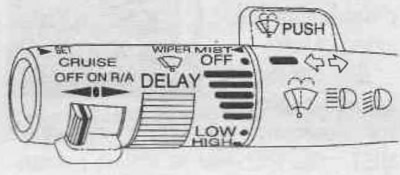
- turn signal switch
- high/low beam switch
- windshield wipers
- windshield washer
- Cruise control (if equipped)
Turn signal switch
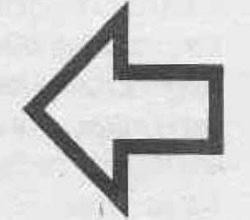
The turn signal has two up (right) and two down (left) positions. These positions allow you to signal a turn or a lane change.
To signal a turn, move the lever all the way up or down. When the turn is complete, the lever will return to its previous position automatically.
The arrow on the instrument panel will flash in the direction of the turn or lane change.
To signal a lane change, raise or lower the lever until the arrow starts flashing. Hold the lever until you complete the lane change. The lever will return to its previous position automatically as soon as you release it.
If you move the lever all the way up or down and the arrow flashes twice as fast, the turn signal light may be burned out and other drivers will not see the turn signal.
Headlight high/low beam switch

To change the headlights from high to low beam, pull the turn signal lever all the way toward you. Then release it.
If the high beam headlights are on, the high beam lamp on the instrument panel will also be on.
Windshield wipers
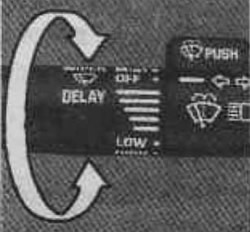
You control the windshield wipers by turning the handle with the wiper symbols on it.
For a single wipe, turn the knob to the MIST position until the wipers begin to move, then release. The wipers will stop after one cycle. If you want more cycles, hold the knob in the MIST position longer.
You can set the speed of the wipers with a longer or shorter delay between movements. This can be useful in light rain or snow.
Turn the knob to select the delay time. The closer to the LOW position, the shorter the delay.
To operate the wipers continuously at low speed, turn the knob to the LOW position. To operate the wipers at high speed, turn the knob longer to the HIGH position. To turn off the wipers, turn the knob to the OFF position.
Rear window wiper and washer
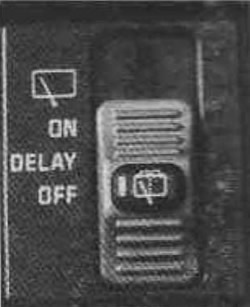
The rear window wiper and washer switch is located on the instrument panel to the right of the instrument cluster.
To turn on the wiper, move the switch all the way up.
To operate the wiper with a delay, move the switch to the center DELAY position, the wiper will operate every nine seconds.
To wash the windows, press the button in the center of the switch. The washer fluid will continue to spray until you release the button. The wiper will move three more times and then return to the mode selected before you pressed the button.
The rear window washer is supplied with fluid from the same reservoir as the front window washer.
If the fluid level in the reservoir is low, you will not be able to wash the rear window. If you can wash the windshield, but cannot wash the rear window, check the fluid level.
Windshield washer
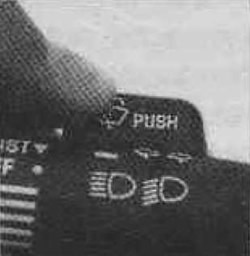
On top of the turn signal lever is a button in the shape of a trigger with the word PUSH on it. To spray the washer fluid on the windshield, press the trigger.
The washer fluid will spray as long as you press the trigger. When you release it, the wipers will work for a few more seconds and then either stop or return to the previously selected speed mode.
Using air deflectors on the hood may adversely affect the operation of the wipers and sprayer.
(The article is based on data from the website «CHEVYMAN.RU»)