


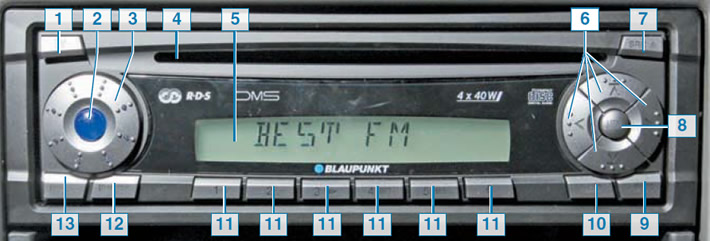
Head unit "radio receiver + CD and MP3 player": 1 - button for detaching the removable front panel; 2 — sound system on/off button (long press) and turn on/off sound (short press); 3 - sound volume control; 4 — slot for installing a compact disc or MP3 disk; 5 - liquid crystal display; 6 — navigation arrow buttons for moving through the settings menu; 7 — SRC/D button for switching sound playback modes from playing CDs and MP3 discs to the radio receiver function and back (long press) and eject the CD or MP3 disc (short press); 8 — MENU button to turn on the air scanning and radio station search function (long press) and activation of the settings mode (short press); 9 — X-BASS button for enhancing low frequency sound; 10 — AUDIO button (sound settings, equalizer); 11 - keys 1 to 6 for switching between radio stations stored in the radio receiver's memory; 12 — TRAF-RDS button for turning on/off the RDS system for transmitting traffic data (long press) and turn on/off the display mode of current RDS system data (short press); 13 — BND-TS button to turn on the automatic saving function for six FM radio stations that are best received in a given area (long press), and switching between FM, CB and LW radio ranges (short press)
Some vehicles are equipped with a sound reproduction system with a head unit that provides radio reception and playback of compact discs, including MP3 format.
The sound system is permanently connected to the vehicle's electrical system, so it can be turned on even when the key is not in the ignition.
It is not recommended to leave the audio system on for a long time with the engine not running, as this may drain the battery.
When the battery is disconnected, all system settings (volume level, radio presets, equalizer settings) are reset and returned to the original (factory) settings.
The liquid crystal display on the front panel of the head unit is constantly illuminated when the audio system is operating. The backlight of the front panel buttons is automatically turned on when the parking lights and instrument panel backlight are turned on.
The front panel is removable to protect the head unit of the playback system from theft: without the panel installed, the head unit is inoperative. If the front panel is accidentally removed while the audio playback system is operating, the system switches off, but after switching on, it retains the previously made settings.
When starting the engine by connecting the battery of another vehicle ("lighting up") it is recommended to turn off the audio system to avoid damaging the head unit. A more detailed description of the audio system functions is contained in the vehicle's "Operating Manual".
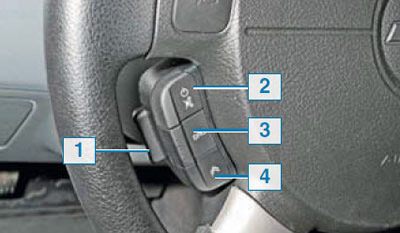
Steering wheel mounted audio system remote control: 1 - Volume control key; 2 - button for turning on/off the sound system and turning off the sound (mUTE mode); 3 — sound reproduction system operating mode switch; 4 - select the next audio track of a CD or MP3 disc, the next radio station stored in memory, or search for a radio station
Some vehicles may be equipped with a remote control for the audio system on the steering wheel (on the left side if the wheel is in the straight-ahead position). The remote control only has keys for controlling individual functions of the sound reproduction system, so its basic settings should be carried out using the buttons located on its front panel.
Using the remote control you can:
- increase (by pressing the top of key 1) or reduce (by pressing the bottom of key 1) sound volume of the sound reproduction system;
- by briefly pressing button 2 - turn on the sound system or turn off its sound; long press - turn off the sound system;
- by pressing button 3, change the operating mode of the sound reproduction system: radio receiver - CD and MP3 player and so on in a circle;
- by briefly pressing button 4, select the next audio track on a CD or MP3 disc or the next radio station stored in memory (only in the forward direction); long press activates the radio station search function (only in the upward direction).
The remote control of the audio system significantly increases the convenience and safety of driving, as it allows the driver to be less distracted from the road. However, this remote control should still be used with caution. Do not use the remote control while turning the steering wheel in one direction or another. In this case, you may have at hand the wrong keys and buttons for controlling the audio system, but random ones. This is not dangerous, but it can distract you from visually searching for the right keys. We recommend that you carefully study the operation of the remote control and practice using it on a stationary car.
(The article was reprinted from the website: ChevyMan.ru)