
ChevyMan.ru
Mazda Mitsubishi Toyota Land Rover Honda Kia Nissan
English Русский
Български
Беларускі
Український
Српски
Hrvatski
Română
Polski
Slovenský
Magyar
|
Articles | Sitemap | Contacts |


Home   Aveo   Captiva   Cruze   Lacetti   Lanos   Niva   Tahoe   Others  
Lacetti 1 (2002-2009)
  • Home
  • Lacetti
  • J200 (2002-2009)
  • Transmission
  • Clutch
  • Adjusting the Clutch Pedal Travel

Adjusting the Clutch Pedal Travel (Chevrolet Lacetti J200)

            0

We carry out the work when replacing the main cylinder of the clutch hydraulic drive or its pusher, clutch pedal.

We measure free travel of the clutch pedal, which should be from 6 to 12 mm (before measuring, the clutch hydraulic drive must be bled). To do this, lightly press the clutch pedal with your hand in the car and measure its travel until resistance to the pedal movement appears. If the free travel of the clutch pedal does not correspond to the required value, it must be adjusted.
We measure free travel of the clutch pedal, which should be from 6 to 12 mm (before measuring, the…


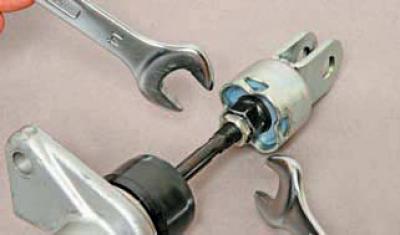
In the car interior, use a 12 mm wrench to loosen the lock nut, holding the 14 mm wrench to prevent the clutch master cylinder pusher fork nut from turning (for clarity, shown on a dismantled master cylinder of the clutch hydraulic drive).
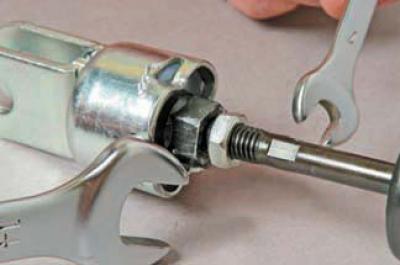
In the car interior, use a 12 mm wrench to loosen the lock nut, holding the 14 mm wrench to prevent…


Holding the pusher fork nut with a 14 mm wrench, use a 7 mm wrench to rotate the pusher rod by the flats, adjusting the amount of free pedal travel.


After adjustment, tighten the lock nut.

With a working clutch the full pedal travel to the stop on the floor mat should be 130–140 mm.

A significant deviation of the full pedal travel from the specified value with obvious signs of improper clutch operation indicates damage to the clutch components or its drive

(The original text can be found on the website: «ChevyMan»)

The article was checked: Vladimir Romannikov
This article is available at russian, bulgarian, belarusian, ukrainian, serbian, croatian, romanian, polish, slovak, hungarian

Share information:

Previous articles
Lacetti 1: Clutch
Next articles

Clutch device
Bleeding the clutch hydraulic drive
Replacing the clutch basket and driven disc
Removal the clutch master cylinder
Replacing the clutch hydraulic hose
Removal the hydraulic drive slave cylinder assembly and clutch release bearing


See similar articles on the topic of Chevrolet cars:
Checking the Clutch Release Pedal Travel Chevrolet Aveo T300 (2012-2018)
Clutch pedal position sensor Chevrolet Captiva 1 (2006-2018)
Checking and adjusting the clutch release pedal travel Chevrolet Cruze 1 (2008-2016)
Adjusting the Clutch Pedal Travel Chevrolet Lanos T150 (2002-2009)
Clutch and brake pedal bracket Chevrolet Niva 1 (2002-2016)
Adjusting the position of the pedal assembly Chevrolet Tahoe 2 and 3 (2000-2014)
Brake pedal travel — check Chevrolet Trailblazer 1 (2001-2008, petrol)
Link in different formats to this page


Visitor comments

No comments yet


How much will 11 + 34 =


Lacetti 1 (2002-2009) 
  • General information
  • User manual
  • Maintenance
  • Power unit
  • Engine repair
  • Control system
  • Supply system
  • Cooling system
  • Exhaust system
  • Transmission
  • Clutch
  • Manual gearbox
  • Front wheel drives
  • Chassis
  • Front suspension
  • Rear suspension
  • Steering
  • Brake system
  • Body
  • Repair of body elements
  • Heating and air conditioning
  • Electrical equipment
  • Engine electrics
  • Lighting and lamps
  • Equipment and devices
  • Electrical circuits


ChevyMan.ru © 2017-2026 · Mobile version · Feedback · Site search · Interesting to read · Sitemap: EN BG BY UA RS HR RO PL SK HU

Aveo 2003-2008 · Aveo 2006-2011 · Aveo 2012-2018 · Captiva 2006-2018 · Cruze 2008-2016 · Lacetti 2002-2009 · Lanos 2002-2009 · Niva 2002-2016 · Tahoe 1992-2000 · Tahoe 2000-2014 · Lumina 1 1989-1994 · Trailblazer 1 2001-2008 · Orlando 1 2010-2018 ·
🛡️ For your security and to improve our service, this site uses cookies. You can disable them in your browser.