


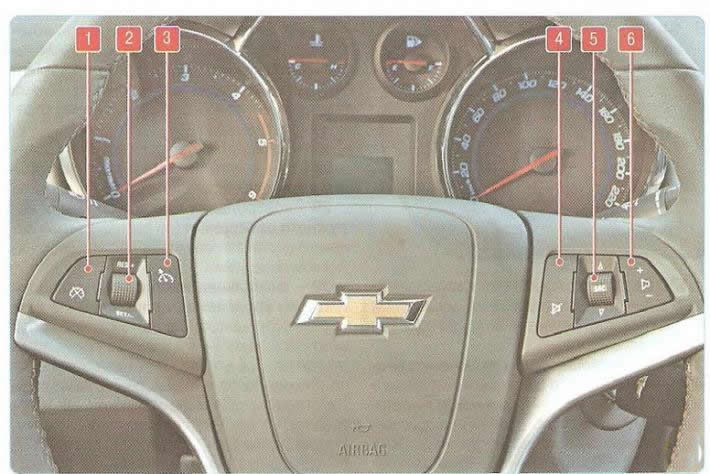
Fig. 1.9. Location of keys on the steering wheel: 1 - reset key for saved speed value; 2 - regulator for increasing or decreasing the speed of the car; 3 - Cruise control switch button; 4 - audio system mute key; 5 - radio track or frequency switch; b - volume control key
To turn on the cruise control system, press button 3 (Fig. 1.9) of the switch. Gain the required speed and turn knob 2 of the switch towards "RES/+" or "SET/-". The current speed of the car will be saved in the system's memory and will be maintained automatically - you can take your foot off the accelerator pedal. To briefly increase the speed, press the accelerator pedal. When you release the pedal, the speed automatically decreases to the previously saved value. To increase the previously saved speed value with the cruise control on, turn knob 2 towards "RES/+" and hold it in this position or move it towards "RES/+" several times - the speed will increase continuously or in small increments, respectively. To decrease the saved speed value with the cruise control on, turn knob 2 towards "SET/-" and hold it in this position or move it towards "SET/-" several times - the speed will decrease continuously or in small increments, respectively. To delete the saved speed value, press button 1. To turn off the cruise control system, press button 3.
Pressing key 6 adjusts the volume of the audio system speakers.
Moving the central key 5 of the switch up or down switches the audio system operating mode (FM1 - FM2 -LW/MW - CD-disc - MP3-disc - additional audio input - audio system off).
Pressing key 4 briefly turns off the audio system sound; pressing the key again restores the sound.
[The original text can be found on the website CHEVYMAN.RU]