
ChevyMan.ru
Mazda Mitsubishi Toyota Land Rover Honda Kia Nissan
English Русский
Български
Беларускі
Український
Српски
Hrvatski
Română
Polski
Slovenský
Magyar
|
Articles | Sitemap | Contacts |


Home   Aveo   Captiva   Cruze   Lacetti   Lanos   Niva   Tahoe   Others  
Captiva 1 (2006-2018)
  • Home
  • Captiva
  • 1 (2006-2018)
  • Manual
  • Instruments and controls
  • On-board computer

On-board computer (Chevrolet Captiva 1)

            0

Contents: Fuel range ↧ Average speed ↧ Time of movement ↧ Average fuel consumption ↧ Compass ↧
The on-board computer provides the driver with such data on the vehicle's movement as fuel range, average fuel consumption, average speed and travel time.

Each time you press the "MODE" button, the display changes in the following order:

distance that can be traveled on the remaining amount of fuel → average speed → driving time → average fuel consumption → distance that can be traveled on the remaining amount of fuel.

To reset the average speed, driving time or average fuel consumption, press and hold the "MODE" button for at least 2 seconds.

To change the distance unit, follow these steps:.

1. Press and hold the "SET" button for at least 2 seconds. The temperature unit should start flashing.

2. Press the "SET" button again. The distance unit starts flashing.

3. Press the ▲ or ▼ button to change the distance unit (km ↔ miles).

Fuel range
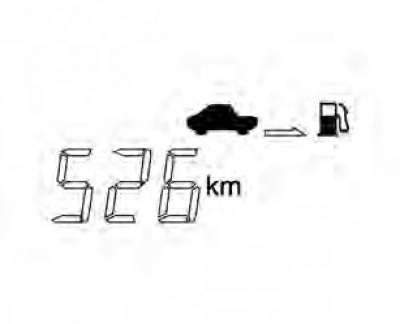


Fuel range


This mode displays the approximate distance the vehicle can travel before the fuel tank is completely empty.

When this distance becomes less than 50 km, "----" is displayed.


Note: Depending on driving conditions, driving characteristics and vehicle speed, the actual distance the vehicle can travel on the remaining amount of fuel may differ from the value shown on the display.


Average speed
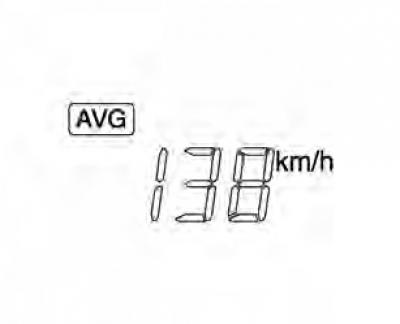


Average speed


In this mode, the display shows the average speed.

To reset the average speed, press and hold the "MODE" button for at least 2 seconds.

Time of movement
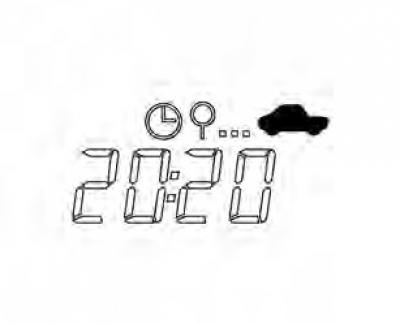


Time of movement


In this mode, the display shows the total travel time. To reset the travel time, press and hold the "MODE" button for at least 2 seconds. After the value of 99:59, the travel time goes back to 0:00.

Average fuel consumption
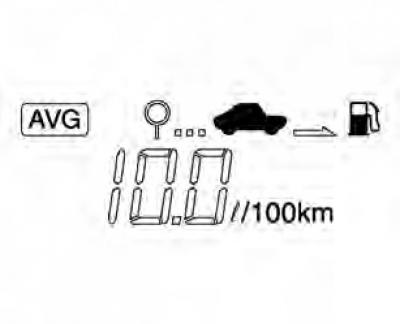


Average fuel consumption


This mode displays the average fuel consumption of the vehicle.


Note: When the battery is disconnected, the average fuel consumption is reset to 10.0.

To reset this parameter, press and hold the "MODE" button for at least 2 seconds.


Note: Depending on driving conditions, actual average fuel consumption may differ from the calculated value.

Average fuel consumption may vary depending on driving conditions, driving style and vehicle speed.


Compass
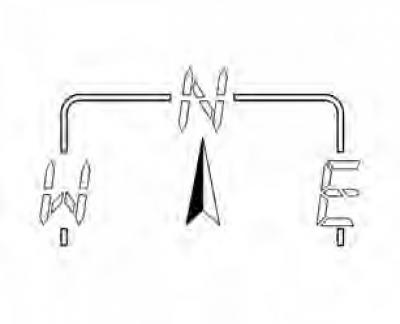


Compass


Displays one of 8 gradations of the vehicle's direction of movement (N, NE, E, SE, S, SW, W, NW).

Note: After any disconnection of the DIC or battery, the DIC must be recalibrated by driving the vehicle in all directions (360°). The compass will not function properly until calibration is completed.
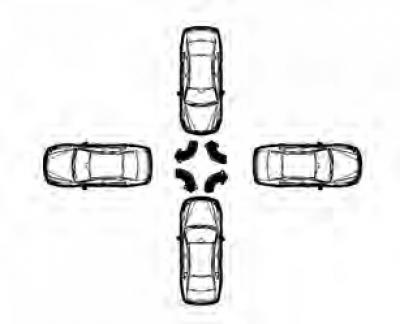

Note: After any disconnection of the DIC or battery, the DIC must be recalibrated by driving the…


1. If you press both the "MODE" and "SET" buttons simultaneously and hold them for at least 2 seconds, the compass display starts flashing.


2. To perform calibration, slowly drive the vehicle one full circle in 90 seconds.

3. After calibration is complete, the compass display stops flashing. When making a circle, you can turn in any direction, right or left.

If there is not enough space to complete one lap, turn the car as shown in the figure below.

Initial conditions for compass calibration


  • Press the "SET" button twice in a row.
  • Then the vehicle must not be turned for 90 seconds after entering calibration mode.

Note: The direction should be displayed while driving. If the compass display continues to flash, turn slowly until the flashing stops.


Note: In compass calibration mode, press "SET" button to enter deviation calibration mode. Now you need to press No. No. or R button and adjust the deviation.


Caution: If mobile phones or magnetic objects are located near the Driver Information Center, the compass may not function properly.

The article was checked: Vladimir Romannikov
This article is available at russian, bulgarian, belarusian, ukrainian, serbian, croatian, romanian, polish, slovak, hungarian

Share information:

Previous articles
Captiva 1: Instruments and controls
Next articles

Information messages
Driver Information Center (DIC)
Control indicators on the instrument panel
Engine coolant temperature gauge
Fuel level indicator


See similar articles on the topic of Chevrolet cars:
On-board computer Chevrolet Aveo T300 (2012-2018)
Diagnostics of faults of on-board electrical equipment Chevrolet Cruze 1 (2008-2016)
Removal and installation the on-board computer Chevrolet Tahoe 2 and 3 (2000-2014)
Computer Command Control System (CCS) and fault codes Chevrolet Lumina 1 (1989-1994)
Link in different formats to this page


Visitor comments

No comments yet


How much will 41 + 44 =


Captiva 1 (2006-2018) 
  • Manual
  • Before leaving
  • Keys, doors and windows
  • Seats, protection systems
  • Instruments and controls
  • Lighting system
  • Information and entertainment
  • Navigation system
  • Climate control
  • Driving a car
  • Car care
  • Maintenance
  • Engine 2.0 l (diesel)
  • Engine device
  • Troubleshooting
  • Engine repair
  • Cooling system
  • Engine electrical equipment
  • Control and power systems
  • Exhaust system
  • Engine FAM II 2.4D
  • Engine device
  • Troubleshooting
  • Engine repair
  • Cooling system
  • Engine electrical equipment
  • Control and power systems
  • Exhaust system
  • Engine HFV6 3.2L
  • Engine device
  • Troubleshooting
  • Engine repair
  • Cooling system
  • Engine electrical equipment
  • Control and power systems
  • Exhaust system
  • Transmission
  • Front drive axle
  • Rear drive axle
  • Automatic gearbox - device
  • Automatic gearbox - service
  • Automatic gearbox - repair
  • Manual gearbox - device
  • Manual gearbox - service and repair
  • Clutch
  • Transfer case
  • Chassis
  • Car suspension
  • Brake system
  • Steering
  • Body
  • Heating and ventilation
  • Air conditioning (manual)
  • Air conditioning (automatic)
  • Seat belts
  • Airbags
  • Car seat
  • Interior (internal elements)
  • Exterior (external elements)
  • Doors and windows
  • Electrical equipment
  • Equipment and devices
  • Lighting and lamps
  • Windshield wipers and washers
  • Electrical circuits


ChevyMan.ru © 2017-2026 · Mobile version · Feedback · Site search · Interesting to read · Sitemap: EN BG BY UA RS HR RO PL SK HU

Aveo 2003-2008 · Aveo 2006-2011 · Aveo 2012-2018 · Captiva 2006-2018 · Cruze 2008-2016 · Lacetti 2002-2009 · Lanos 2002-2009 · Niva 2002-2016 · Tahoe 1992-2000 · Tahoe 2000-2014 · Lumina 1 1989-1994 · Trailblazer 1 2001-2008 · Orlando 1 2010-2018 ·
🛡️ For your security and to improve our service, this site uses cookies. You can disable them in your browser.