


It allows you to receive:
- information about the state of the vehicle systems;
- route/fuel information.
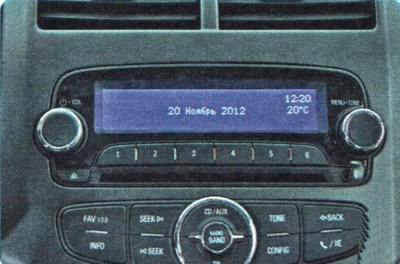
Information from the on-board computer is displayed on the central display of the infotainment system.
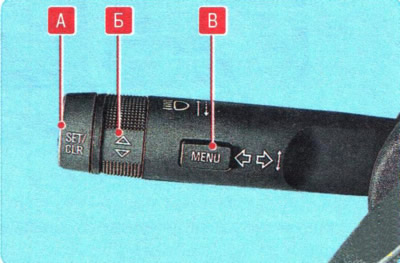
To display information on the central information display, use the controls located on the left steering column switch lever.
To select the route/fuel menu (trip computer function) press the button B ("MENU").
By turning the knob B, select one of the following submenus:
- average speed;
- power reserve;
- average fuel consumption;
- travel time.
Average vehicle speed mode. This mode displays the average speed of the vehicle, calculated based on the distance traveled and the time spent on the road since the battery was connected or the data was reset. The average speed of the vehicle is recalculated and displayed every 10 seconds.
To reset the data, press and hold button A ("SET/CLR") on the steering column switch for more than 1 second. After pressing this button, the display will show "----km/h" for about 1 minute, then the average vehicle speed will be recalculated and displayed.
Mode for displaying the distance that can be traveled on the remaining fuel in the tank (power reserve). This mode displays the approximate distance that can be traveled on the remaining fuel in the tank, taking into account the average values of driving speed and fuel consumption. This distance is recalculated and updated every second.
WARNING: Even if the display shows sufficient distance to your intended refueling point, refuel as soon as possible if the lowest mark near the letter E on the fuel gauge remains shaded, especially if the low fuel indicator light comes on.
NOTE: The display will not change until approximately 20L or more of fuel has been added to the tank.
Average fuel consumption mode. This mode displays the average fuel consumption calculated based on the amount of fuel consumed and the distance traveled since the battery was connected or the data was reset.
To reset the data, press and hold button A ("SET/CLR") on the steering column switch for more than 1 second. After pressing this button, the display will show the message for approximately 1 minute "----L/100km", then the recalculation and display of average fuel consumption will begin.
Trip duration mode. This mode displays the total trip time since the last reset.
Information messages are displayed on the central display automatically as needed. They contain information about the state of the vehicle systems and recommendations for maintenance of a particular unit. Depending on the vehicle configuration, a wide range of information messages may be displayed. To confirm a message, press button A ("SET/CLR") on the steering column switch. By pressing button B ("MENU"), you can display several messages one after the other.
Messages are displayed on the screen in the form of digital codes:
- 15 - Malfunction of additional brake light;
- 18 - Malfunction of the low beam left headlight;
- 19 - Rear fog light malfunction;
- 20 - Right headlight low beam malfunction;
- 21 - Malfunction of the left front parking light;
- 22 - Malfunction of the right front parking light;
- 23 - Malfunction of the reversing light;
- 24 - Malfunction of license plate lights;
- 25 - Left front turn signal malfunction;
- 26 - Malfunction of the left rear direction indicator;
- 27 - Right front turn signal malfunction;
- 28 - Malfunction of the right rear direction indicator;
- 84 - Engine power reduced;
- 89 - The car will need regular maintenance soon.
[The material was created based on information from the website: «ChevyMan.ru»]