
ChevyMan.ru
Mazda Mitsubishi Toyota Land Rover Honda Kia Nissan
English Русский
Български
Беларускі
Український
Српски
Hrvatski
Română
Polski
Slovenský
Magyar
|
Articles | Sitemap | Contacts |


Home   Aveo   Captiva   Cruze   Lacetti   Lanos   Niva   Tahoe   Others  
Captiva 1 (2006-2018)
  • Home
  • Captiva
  • 1 (2006-2018)
  • Manual
  • Driving a car
  • Rear View Camera (RVC)

Rear View Camera (RVC) (Chevrolet Captiva 1)

            0

Contents: Turning on the rear view camera ↧ Rear view camera location ↧
The RVC system makes it easier to control the vehicle when reversing by displaying the area behind the vehicle on the display. When the key is in the ON/START position and the driver shifts the gear to R (reverse), the video image is automatically displayed on the LCD screen.

When switching from R to another gear, the video image is automatically removed from the screen.

Warning: The Rear View Camera (RVC) system is not a substitute for the driver's own vision.

The RVC system cannot:

- Detect objects that are outside the camera's field of view, under the bumper or under the car.

- Recognize children, pedestrians, cyclists and animals.

Do not reverse using the RVC screen alone, or use the screen when reversing over long distances and at high speeds, or when other vehicles may pass in the transverse direction. The distance estimated by the screen is different from the actual distance.


Warning: If you do not exercise due caution when reversing, you may collide with another vehicle, child, pedestrian, bicyclist, animal, which may result in vehicle damage, injury or even death. Even if your vehicle is equipped with RVC, always check the area behind and around your vehicle thoroughly before reversing.


Turning on the rear view camera


Turning the rear view camera system on and off When the key is in the ON/START position and the driver shifts into R (reverse), when you press the CAM (Camera) button on the infotainment system, a video image is displayed on the LCD screen.


Rear view camera location
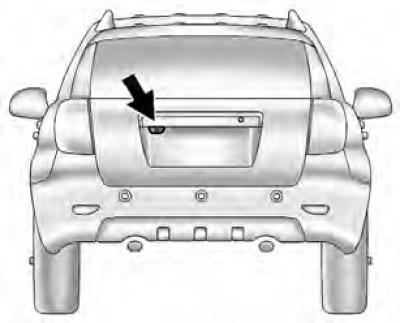


Rear view camera location


The rear view camera is located at the rear of the car.

The camera's field of view is limited and does not cover objects located in corners and under the bumper. The displayed field of view may change depending on the orientation of the vehicle and the condition of the road surface. The distance estimate from the image on the screen may differ from the actual distance to the obstacle.

If the system does not work as expected


The RVC system may not function properly or the image it transmits may not be clear enough under the following circumstances:
  • The RVC system is disabled.
  • In low light conditions.
  • The camera lens is exposed to sunlight or headlights from another car,
  • The camera lens is covered with ice, snow or dirt. Clean the lens, rinse it with water and dry it with a soft cloth.
  • The rear of the car was damaged in an accident. The position and angle of the camera may have been knocked off, the camera may have been damaged. Check the serviceability, position and angle of the camera at a service station.
  • There are sharp temperature changes.

The article was checked: Vladimir Romannikov
This article is available at russian, bulgarian, belarusian, ukrainian, serbian, croatian, romanian, polish, slovak, hungarian

Share information:

Previous articles
Captiva 1: Driving a car
Next articles

Ultrasonic parking assistance system
Cruise control
Motion control systems
Parking brake
Anti-lock braking system (ABS)
Fuel grades for gasoline engines
Fuel grades for diesel engines
Filling the fuel tank


See similar articles on the topic of Chevrolet cars:
Rear view mirrors Chevrolet Aveo T300 (2012-2018)
Rear view mirrors Chevrolet Cruze 1 (2008-2016)
Rear window and exterior rear view mirror heating circuit diagram Chevrolet Lacetti 1 (2002-2009)
Rear view mirrors Chevrolet Lanos T150 (2002-2009)
Rear fog lights on/off control Chevrolet Niva 1 (2002-2016)
Removal and installation the rear view camera Chevrolet Tahoe 2 and 3 (2000-2014)
Rear view camera Chevrolet Orlando 1 (2010-2018)
Link in different formats to this page


Visitor comments

No comments yet


How much will 48 + 12 =


Captiva 1 (2006-2018) 
  • Manual
  • Before leaving
  • Keys, doors and windows
  • Seats, protection systems
  • Instruments and controls
  • Lighting system
  • Information and entertainment
  • Navigation system
  • Climate control
  • Driving a car
  • Car care
  • Maintenance
  • Engine 2.0 l (diesel)
  • Engine device
  • Troubleshooting
  • Engine repair
  • Cooling system
  • Engine electrical equipment
  • Control and power systems
  • Exhaust system
  • Engine FAM II 2.4D
  • Engine device
  • Troubleshooting
  • Engine repair
  • Cooling system
  • Engine electrical equipment
  • Control and power systems
  • Exhaust system
  • Engine HFV6 3.2L
  • Engine device
  • Troubleshooting
  • Engine repair
  • Cooling system
  • Engine electrical equipment
  • Control and power systems
  • Exhaust system
  • Transmission
  • Front drive axle
  • Rear drive axle
  • Automatic gearbox - device
  • Automatic gearbox - service
  • Automatic gearbox - repair
  • Manual gearbox - device
  • Manual gearbox - service and repair
  • Clutch
  • Transfer case
  • Chassis
  • Car suspension
  • Brake system
  • Steering
  • Body
  • Heating and ventilation
  • Air conditioning (manual)
  • Air conditioning (automatic)
  • Seat belts
  • Airbags
  • Car seat
  • Interior (internal elements)
  • Exterior (external elements)
  • Doors and windows
  • Electrical equipment
  • Equipment and devices
  • Lighting and lamps
  • Windshield wipers and washers
  • Electrical circuits


ChevyMan.ru © 2017-2026 · Mobile version · Feedback · Site search · Interesting to read · Sitemap: EN BG BY UA RS HR RO PL SK HU

Aveo 2003-2008 · Aveo 2006-2011 · Aveo 2012-2018 · Captiva 2006-2018 · Cruze 2008-2016 · Lacetti 2002-2009 · Lanos 2002-2009 · Niva 2002-2016 · Tahoe 1992-2000 · Tahoe 2000-2014 · Lumina 1 1989-1994 · Trailblazer 1 2001-2008 · Orlando 1 2010-2018 ·
🛡️ For your security and to improve our service, this site uses cookies. You can disable them in your browser.