


Contents: Electronic Stability Control (ESC) ↧ Brake booster function ↧ Active rollover protection function ↧ Traction Control System (TCS) ↧ Trailer Stability Assist (TSA) ↧ Hill Start Assist (HSA) ↧ ESC off button ↧ Downhill Control System (DCS) ↧ Conditions for activation of the… ↧
Electronic Stability Control (ESC)
Attention: If you decide to install winter tires on your car, use only tires recommended by the car service.
Using the wrong type of winter tyres may adversely affect the performance of the stability control system.
For information on available winter tyres and to select the appropriate type of tyre, please contact an authorised service centre.
ESC is an electronic vehicle stabilization system and an additional driving safety system. It helps to avoid dangerous situations by braking the wheels or reducing engine torque. This ensures vehicle stability in situations where the vehicle becomes extremely unstable, such as when cornering sharply or changing lanes quickly. The ESC function is automatically activated when the vehicle becomes extremely unstable. Under normal driving conditions, the ESC system is not active.
When the ignition is turned on, the ESC activity indicator and the ESC deactivation indicator light up. They turn off after about 4 seconds.
The ESC activity indicator flashes while the system is operating. If the indicator is constantly on, it indicates a fault in the system. In this case, you should contact a car service center as soon as possible.
Cm. Electronic Stability Control (ESC) indicator.
Warning: When the ESC activity indicator comes on, it indicates a malfunction of the ESC system. Contact a service station immediately for assistance.
Brake booster function
When the ESC system detects an emergency situation requiring abrupt braking, it automatically increases the braking pressure on the wheels.
Active rollover protection function
This function is part of the ESC system. If the car becomes extremely unstable while driving, this function helps it maintain normal stability.
Traction Control System (TCS)
The traction control system prevents the drive wheels from slipping, regardless of road conditions and tire grip. As soon as even one drive wheel begins to slip, engine power is reduced and the slipping wheel slows down. This improves vehicle control and drive efficiency, especially when driving on snow or ice, or on wet or slippery roads.
Trailer Stability Assist (TSA)
It is difficult to control road trains that sway while moving. This function detects sway and reduces the speed of the road train until the swaying stops. The speed reduction is achieved by reducing engine torque and increasing the pressure in the brakes of all wheels.
Hill Start Assist (HSA)
This system helps prevent the vehicle from rolling backwards when starting off on a slope.
If the vehicle is parked uphill, when you press the accelerator pedal and release the brake pedal, the brake continues to apply for approximately 2 seconds.
ESC off button
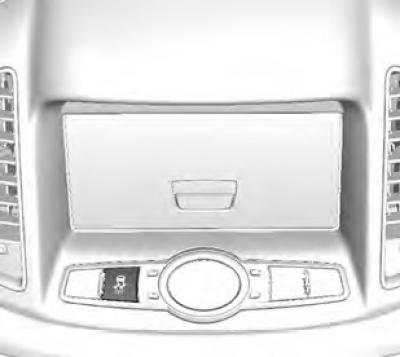
The ESC system can be switched off by pressing the "ESC OFF" button located in the center of the instrument panel.
Pressing the ESC off button again when the ESC system is off (eSC off indicator is on) causes the system to resume operation, which is accompanied by the ESC off indicator on the instrument panel turning off.
Note: Activating the ESC system to correct vehicle stability reduces vehicle speed and allows you to pay more attention to the road.
The ESC system is the only auxiliary device of the car. When the driving parameters of the car go beyond the physical limitations, it loses control. Do not rely entirely on this system. Follow the rules of safe driving.
When the ESC system is operating, you may hear some noise or feel vibration from the brake pedal or other relevant systems. This may be caused by pressure changes in the relevant systems.
Downhill Control System (DCS)
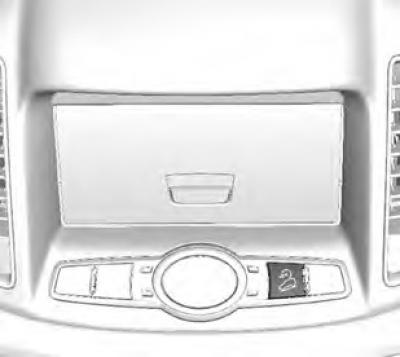
When driving down a steep slope, this function allows you to drive at low speed without using the brake pedal, allowing you to concentrate on steering. This convenient function is only intended for driving down steep slopes.
To activate the downhill assist system, press the corresponding button in the center of the instrument panel. Pressing this button makes the system ready. The green indicator for downhill assist system activity lights up. This indicator flashes as long as the system is operating.
To turn off the DCS system, press the DCS switch again. The DSC activity indicator will go out.
Flashing yellow downhill assist not ready indicator indicates that the system is not ready for operation, while continuous lighting of this indicator indicates a fault in the system.
Cm. Downhill Assist Indicator.
Caution: If the downhill assist not ready indicator comes on, this indicates a fault with the downhill assist system. Contact a service station immediately for assistance.
Conditions for activation of the downhill assist system
1. You need to press the downhill assist button (the green system activity indicator will light up).
2. A descent with a slope of a certain magnitude.
3. Movement at a speed of no more than 50 km/h. (The downhill assistance system does not operate at speeds exceeding 50 km / h, even if the DCS switch button is pressed. The system will start up again as soon as the vehicle speed drops back to 30 km / h after exceeding the 50 km/h mark.)
4. The accelerator or brake pedal is not pressed. (The downhill assist system does not activate when the accelerator or brake pedal is depressed.)
Caution: The Downhill Assist feature is designed for steep descents in off-road conditions.
Unreasonable use of the DCS system may result in failure of the brake system or ESC system. Do not use the downhill assist system on normal roads.
When the downhill assist system is operating, strong vibrations or noise may occur in the brake system. This is normal.
The article is reprinted from the website chevyman.ru