


Contents: Setting up cruise control ↧ Recalling a stored speed value from… ↧ Increasing speed while using cruise… ↧ Reduce speed when using cruise… ↧ Overtaking another vehicle while… ↧ Using Cruise Control on Slopes ↧ Turning off cruise control ↧ Deleting a set speed value from… ↧
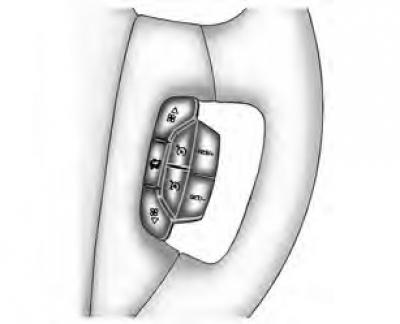
If the car is equipped with a cruise control system, you can maintain a constant speed of about 40 km/h without pressing the accelerator pedal. This makes driving much easier on long trips. Cruise control does not work at speeds below 40 km/h.
When the brakes are applied or the Q button is pressed, the cruise control is switched off.
If the traction control system begins to limit wheel speed while the cruise control is on, the cruise control is switched off. You can switch the cruise control on again when the traffic conditions allow its safe use.
Warning: Using cruise control can be dangerous where it is not possible to safely drive at a constant speed. Therefore, do not use cruise control on winding roads or in heavy traffic conditions.
Using cruise control can be dangerous on slippery roads. On slippery roads, the rapid change in tire grip can cause excessive wheel spin, which can result in loss of vehicle control. Do not use cruise control on slippery roads.
Setting up cruise control
1. To turn on cruise control, press the button
 , located to the right of the steering wheel.
2. Accelerate the car to the desired speed.
3. Press the "SET/-" button and release it. The indicator on the instrument cluster panel will light up, indicating that the cruise control is on.
4. Remove your foot from the accelerator pedal.
Caution: If you leave the cruise control on when you don't need it, accidentally pressing the button may cause it to activate. This may be unexpected and cause you to lose control of your vehicle. Therefore, be sure to turn off the cruise control when you don't need to use it.
Recalling a stored speed value from memory
Suppose you set the desired cruise control speed, and then press the brake pedal, or press the I button. This will naturally turn off the cruise control. However, you do not need to set the cruise control speed again. After reaching 40 km/h or more, you can quickly press the "RES/+" button.
Cruise control will return to the previously selected speed and maintain it.
When you hold down the "RES/+" button, the car will accelerate until you release the button or press the brake pedal or the I button. Therefore, you should not hold down the "RES/+" button unless you want to increase speed.
Increasing speed while using cruise control
There are two ways to increase speed:
- To increase the speed, press the accelerator pedal. Press the "SET/-" button, then release it and the accelerator pedal. This sets a new cruise control speed.
- Press the "RES/+" button. Hold it in this position until the desired speed is set, then release the button. To increase the speed by a very small amount, press and release the "RES/+" button very quickly. This method increases the speed by about 2 km/h. This method of acceleration works only after the cruise control is turned on by pressing the "SET/-" button.
Reduce speed when using cruise control
There are two ways to reduce speed when using cruise control:
- Press the "SET/-" button until the speed decreases to the desired value, then release it.
- To decrease the speed by a very small amount, press the "SET/-" button once quickly. After this action, the speed decreases by approximately 2 km/h.
Overtaking another vehicle while using cruise control
To increase speed, press the accelerator pedal. The car slows down to the previously set speed when the driver removes his foot from the accelerator pedal.
Using Cruise Control on Slopes
The order of using cruise control on hilly terrain depends on the speed and load of the vehicle, as well as the steepness of the slope. On a long climb, it may be necessary to use the accelerator pedal to maintain speed. On a descent, it may be necessary to use the brakes or shift to a lower gear to reduce speed. When you press the brake pedal, of course, the cruise control is turned off. For many drivers, this driving mode is inconvenient and they do not use cruise control on long slopes.
Turning off cruise control
There are several ways to turn off cruise control:
- Press the brake pedal or button lightly , or the clutch pedal if the gearbox is manual.
- Click the button on the cruise control panel.
Deleting a set speed value from memory
When you turn off the cruise control or turn off the ignition, the set cruise control speed is not saved.