


2. The controls are located on the driver's door panel.
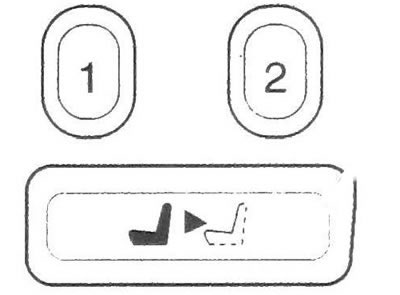
20.2 Seat adjustment memory buttons
3. To program the memory function:
a) Adjust the position of the driver's seat, outside rearview mirrors and adjustable accelerator and brake pedals (additional equipment).
b) Press button 1 and hold it down for three seconds. You will hear a double gong signal confirming that the settings you have made have been remembered.
4. To memorize the second position, repeat the above steps and press button 2. Now, when the automatic transmission selector lever is in the P (Park) position and you press one of the memory buttons, 1 or 2, you will hear a gong and the previously memorized settings will be restored.
5. Recalling the stored adjustments can be stopped by pressing any seat adjustment switch or the memory button.
6. You can also use the Driver Information Center (additional equipment) to program the settings to be restored when you press the unlock button on the remote control, or when you insert the key into the ignition. Leaving the vehicle
7. To make it easier to get in and out of the vehicle, you can use the exit button A when the automatic transmission selector is in the P (Park) position (see illustration 20.2). When you press this button, the seat moves to the comfortable position you set for disembarking. You can program different positions for two different drivers.
8. To program a personal seat position to make it easier to exit the vehicle:
a) Press the memory button 7.
The seat will move to the previously remembered position.
b) Adjust the driver's seat to the desired position to facilitate exiting the vehicle.
c) Press and hold the release button for three seconds, you will hear a double gong signal confirming that the settings you have made have been remembered.
9. To memorize the second position, repeat the above steps and press button 2. Now, when you press the exit button with the automatic transmission selector in P (Park), the seat will move to your personal exit position.
10. If an individual exit position has not been programmed, pressing the exit button will move the driver's seat to its rearmost position. You can use the Driver Information Center (if available), to program the recall of a convenient driver's seat position for exiting when the key is removed from the ignition switch.
[The article is based on data from the website: «ChevyMan.ru»]