


Contents: Exterior rear view mirrors ↧ Interior rearview mirror with… ↧ Compass calibration ↧ Interior rearview mirror with… ↧ Toilet mirrors (additional equipment) ↧
Exterior rear view mirrors
1. Adjust the outside rearview mirrors so that you can see the side of your vehicle when you are sitting in a comfortable driving position.
2. Some vehicles may be equipped with panoramic rearview mirrors. The convex surface of the panoramic mirror expands the rear view area from the driver's seat.
Warning: panoramic mirrors give the illusion that objects are much further away than they actually are. Therefore, before making a maneuver, also look in the interior rearview mirror or look over your shoulder. This will help you to more accurately assess the traffic situation and make the right decision.
Manually folding exterior mirrors
3. Your vehicle is equipped with folding outside rearview mirrors. To prevent mirrors from breaking at a car wash or when parking on a narrow street, they should be folded towards the car body.
Electrically adjustable exterior rear view mirrors
4. Select left or right mirror for adjustment by turning the switch to the right or left. To adjust the position of the mirror, press the corresponding arrows on the regulator.
5. If you do not want to adjust the position of the mirrors, then set the switch to the middle position, which corresponds to the "Off" state.
6. Each outside rearview mirror has a turn signal that flashes in the direction of a turn or lane change when the turn signals are turned on.
Electrically heated exterior rear view mirrors
7. The heated outside rearview mirrors are switched on automatically each time the rear window heater is switched on. This helps remove ice, snow and condensation from them.
Interior rearview mirror with "day/night" positions
8. The interior rearview mirror is mounted on a hinge, so you can adjust its position by turning the mirror up, down, right or left.
Interior rearview mirror with manual "day/night" switching (additional equipment)
9. During the day, the mirror reflects all the light falling on it from behind. At night, when the glare from headlights increases sharply, the mirror surface is darkened to reflect only part of the light falling on it from behind.
10. To set the mirror to the position appropriate for night driving, turn the adjuster clockwise; for daytime driving, return the control to the center position.
Interior rearview mirror with automatic day/night switching and compass (additional equipment)
Caution: Do not apply glass cleaner directly to the surface of the interior rearview mirror. Liquid may get inside the mirror housing and damage the compass. To clean the mirror, use a cloth or paper towel soaked in glass cleaner.
11. Your vehicle may be equipped with a fully automatic interior rearview mirror, which has an on/off button located near the mirror bracket.
12. During the day, the mirror reflects all the light falling on it from behind. At night, when the glare from headlights increases sharply, the mirror surface is darkened to reflect only part of the light falling on it from behind.
13. To turn on the automatic dimming function of the interior rearview mirror, press button 0. When the system is turned on, the indicator on the mirror will light.
14. To turn the compass on or off, press the button. Compass readings appear on the display located in the upper right corner of the interior rearview mirror.
15. While driving, the display will show the inscriptions N (North), NE (Northeast), E (East), SE (Southeast), S (South), SW (Southwest), W (West) or NW (Northwest), indicating the direction of movement.
16. If no readings appear on the display within a few seconds of turning on the compass, the compass may need to be calibrated.
17. The operation of the compass may be interfered with by strong magnetic fields from various magnetic objects located in the vehicle. Remove these items or contact your dealer for assistance.
18. If the compass display shows incorrect readings, first make sure that the compass has been set to the correct magnetic declination value for the geographic area in question. If the magnetic declination is set incorrectly, the compass requires calibration.
19. Magnetic declination is the difference between the directions of the Earth's magnetic north pole and the true geographic north pole. Your vehicle's compass should be set to match the geographic area in which you are traveling.
20. If your vehicle moves to a different area, you may need to change the compass setting to compensate for the change in magnetic declination.
Compass calibration
21. Your vehicle's compass is self-calibrating, but if the display shows CAL (Calibration), or if the compass is giving clearly incorrect readings, you can calibrate it manually.
a) To calibrate the compass, the display must show the inscription CAL. If this inscription is not present, then press the compass power button and hold it until the inscription CAL appears on the display (Calibration).
b) After selecting a safe location, drive the vehicle slowly in a 360° circle at a speed of no more than 8 km/h until the compass readings appear on the display.
Magnetic declination of the compass
22. Magnetic declination is the difference between the directions of the Earth's magnetic north pole and the true geographic north pole. Your vehicle's compass should be set according to the geographic area in which you are traveling. If your vehicle moves to a different area, you may need to change the compass setting to compensate for the change in magnetic declination.
23. To correct the magnetic declination of the compass:
a) Contact your dealer to find out what geographic area you are in.
b) Press and hold the compass on/off button until the geographic area number appears on the display. The display will show the number of the last set magnetic declination zone.
c) Press the compass power button repeatedly until the correct geographic zone number appears on the display. After a few seconds, the display will show the direction of travel.
d) Calibrate the compass if necessary.
Interior rearview mirror with automatic day/night switching, compass and thermometer (additional equipment)
Caution: Do not apply glass cleaner directly to the surface of the interior rearview mirror. Liquid may get inside the mirror housing and damage the compass. To clean the mirror, use a cloth or paper towel soaked in glass cleaner.
24. Your vehicle may be equipped with a fully automatic interior rearview mirror, which has an on/off button located near the mirror bracket.
25. During the day, the mirror reflects all the light falling on it from behind. At night, when the glare from headlights increases sharply, the mirror surface is darkened to reflect only part of the light falling on it from behind.
26. To turn on the automatic dimming function of the inside rearview mirror, press and hold the COMP or TEMP button.
When the system is turned on, the indicator on the mirror will light up.
27. This also activates the automatic dimming function of the outside rearview mirrors (additional equipment).
28. The mirror also has a compass and outside temperature display in the upper right corner. To turn this display on or off, press and release either the TEMP or COMP button.
Outside air temperature indicator
29. To turn the display on or off, press the TEMP button (Temperature).
30. To switch the display to the units selection mode, press and hold the TEMP button until°F and°C begin to flash on the display. Then press and release the TEMP button to select English or Metric temperature units. If you do not press any buttons for a few seconds, the display will stop flashing and return to showing the temperature in the previously selected units of measurement. If the thermometer shows an incorrect temperature, contact your dealer.
Compass operation
31. To turn the compass on or off, press the COMP (Compass) button while the ignition is on.
32. Compass readings appear on the display located in the upper right corner of the interior rearview mirror.
33. While driving, the display will show the inscriptions N (North), NE (Northeast), E (East), SE (Southeast), S (South), SW (Southwest), W (West) or NW (Northwest), indicating the direction of movement.
34. If the compass readings do not appear on the display within five seconds after switching on, or if the message CAL appears on the display while driving, the compass needs to be calibrated.
35. The operation of the compass may be interfered with by strong magnetic fields from various magnetic objects located in the vehicle. Remove these items or contact your dealer for assistance.
36. Calibration of the compass is also required when it gives incorrect readings.
37. If the compass display shows incorrect readings, first make sure that the compass has been set to the correct magnetic declination value for the geographic area in question. If the magnetic declination is set incorrectly, the compass requires calibration.
38. Magnetic declination is the difference between the directions of the Earth's magnetic north pole and the true geographic north pole. Your vehicle's compass should be set to match the geographic area in which you are traveling.39. If your vehicle is moved to a different area, the compass setting may need to be changed to compensate for changes in magnetic declination.
Compass calibration
40. Your vehicle's compass is self-calibrating, but if the display shows CAL (Calibration), or if the compass is giving clearly incorrect readings, you can calibrate it manually.
a) To calibrate the compass, the display must show the inscription CAL. If the display does not show this inscription, press the COMP button until the display shows the inscription CAL (Calibration).
b) After selecting a safe location, drive the vehicle slowly in a 360' circle at a speed of no more than 8 km/h until the compass readings appear on the display.
41. Magnetic declination is the difference between the directions of the Earth's magnetic north pole and the true geographic north pole. Your vehicle's compass should be set to match the geographic area in which you are traveling.
42. If your vehicle moves to a different area, you may need to change the compass setting to compensate for the change in magnetic declination.
43. To correct the magnetic declination of the compass:
a) Contact your dealer to find out what geographic area you are in.
b) Press and hold the COMP button until the geographic area number appears on the display.
c) Press the COMP button until the correct geographic area number appears on the display, then release the button. After a few seconds, the display will show the direction of travel.
Front passenger airbag on/off indicator
44. Your vehicle is equipped with a front passenger presence detection system.
45. When the engine is started, the airbag "ON" and "OFF" indicators will briefly light up on the interior rearview mirror (see illustration). Depending on the status of the front passenger airbag system, one of the indicators will remain on.
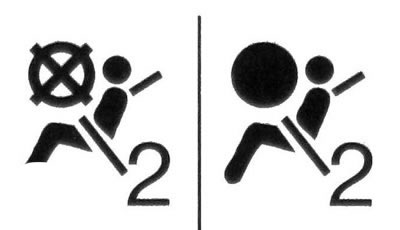
10.45 Front passenger airbag "ON" and "OFF" indicators
Toilet mirrors (additional equipment)
46. Toilet mirrors are located on the sun visors. If your vehicle is equipped with illuminated vanity mirrors, the light will come on when the mirror cover is opened and go out when it is closed.