


Contents: Removal procedure ↧ Installation procedure ↧
Removal procedure
1. Remove the steering column opening pillar in the instrument panel. See Section 9E, Instrumentation/Driver Information System.
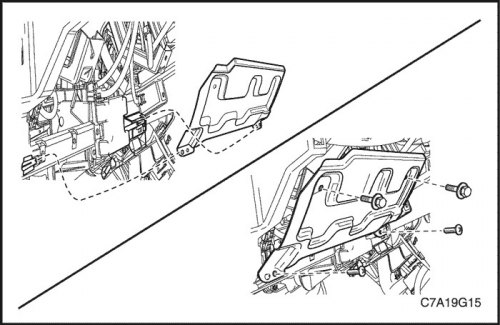
2. Unscrew the screws and bolts.
3. Remove the driver's knee bolster.
Installation procedure
1. Install the driver's knee bolster and tighten the screws and bolts.
Tighten
Tighten the driver's knee bolster screws to 2.5 Nm (23 lbs.in).
Tighten the driver's knee bolster bolts to 20 Nm (15 lb-ft).
2. Install the steering column opening pillar into the instrument panel. See Section 9E, Instrumentation/Driver Information System.