


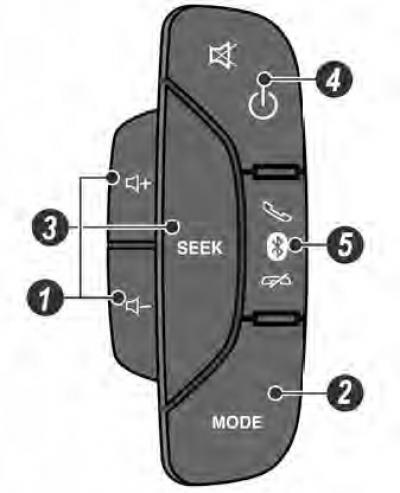
1. Volume [+/-] buttons
- Pressing these buttons increases/decreases the volume in steps.
- Press and hold the button for more than 1 second to quickly increase/decrease the volume level.
2. SEARCH button [SEEK]
- Press this button to change the active radio station to another one (from among the saved) or switch to another piece of music.
- Hold the button down for more than 1 second to quickly search up the frequency range or forward through the active directory of records.
3. MODE button
- Press this button to select the audio system mode: Radio, AUX or CD/MP3/USB/iPod/Bluetooth.
4. POWER/MUTE button [PWR/MUTE]
- Press this button in standby mode to turn on the infotainment system.
- Press this button in any playback mode to mute and unmute the sound.
- Press and hold this button for more than 1 second to turn off the infotainment system.
5. CALL button
- Press this button in standby mode to make a call or answer an incoming call.
- Press this button twice to redial the last number.
- Press and hold this button for more than 1 second to cancel a call or end a phone conversation.
(The source of the article is available on the website «CHEVYMAN.RU»)