


Contents: Type 1: Radio + CD/MP3 + Bluetooth +… ↧ Type 2: Radio + CD/MP3 + Bluetooth +… ↧ Type 3: Radio + CD/MP3 changer +… ↧
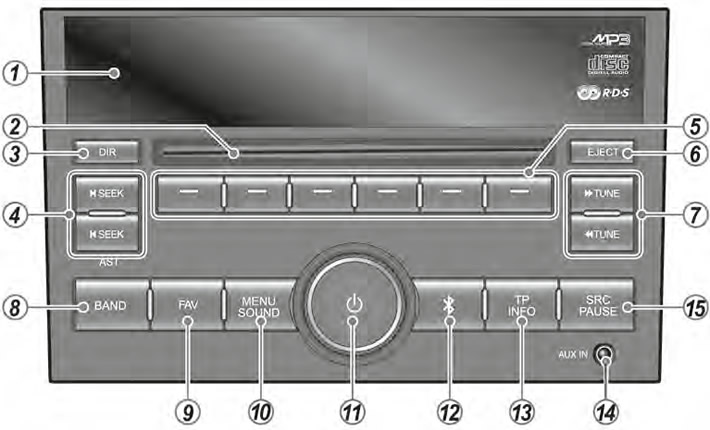
Type 1: Radio + CD/MP3 + Bluetooth + USB/iPod option
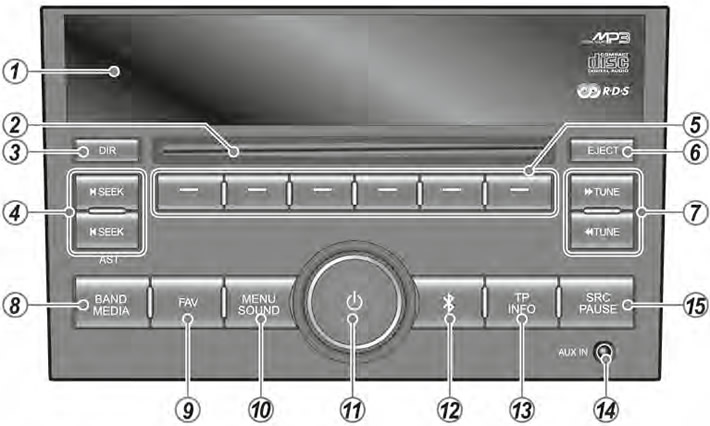
Type 2: Radio + CD/MP3 + Bluetooth + USB/iPod + A-NAVI option
Type 3: Radio + CD/MP3 changer + Bluetooth
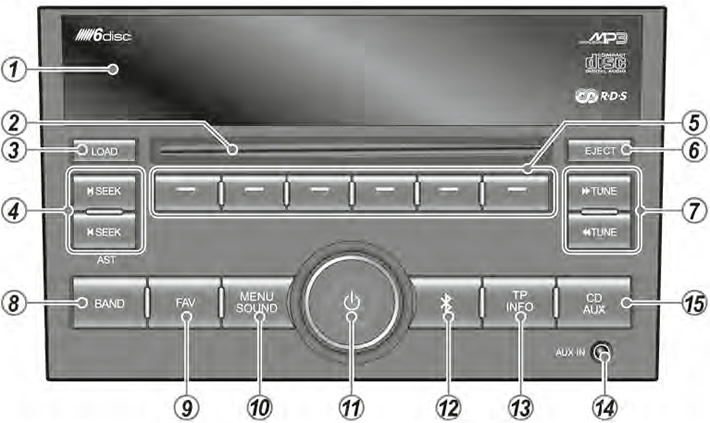
1. Display: Display playback/reception/menu modes and information.
2. Disc loading slot. Used to load and eject CDs.
3. DIR button (only for types 1/2). Select to play the catalog or all tracks. LOAD button (only for type 3).
This button is used to insert a disc into the infotainment system.
4. Buttons

Radio reception mode:
- Press: Search for the next/previous receivable station up/down in frequency.
- Hold down: auto save (only for types 2/3)
CD/MP3 mode or USB/iPod option:
- Search search next/previous media library
5. Function buttons Select the functions displayed on the display.
6. EJECT button [Z]: Pressing this button ejects the disc.
7. Buttons

- In radio reception mode - select a radio station (decrease/increase frequency)
- In CD/MP3 mode or USB/iPod option - play the previous/next track or quickly search backwards through the tracks being played.
8. RANGE button. Pressing this button selects the FM/AM or DAB radio range (only for type 2).
9. FAVORITES button [FAVORITES] Switches between pages of fixed settings.
10. MENU/SOUND button:
- Pressing
- In FM or DAB radio mode (digital Radio Broadcasting: Type 2 only): Use the RDS menu or DAB menu.
- In iPod mode: Using the iPod Media Library feature (option only for type 1/2)
- Hold down: Press to switch between tone and balance control modes (front/rear and left/right speakers).
11. POWER [P] button with VOLUME knob.
If the audio system power is on:
- Press: Turn sound on and off.
- Hold down: Turns off the audio system power.
- Turn the knob to adjust the volume or tone - in tone control mode.
If the audio system power is off:
- Pressing the power button turns on the audio system.
12. BLUETOOTH [4] Selects the BLUETOOTH functions displayed on the display.
13. TRAFFIC MESSAGES/INFORMATION [TP/INFO] button:
- Press: Sets up the reception of traffic messages.
- Hold down: Displays necessary information on the operations performed in each mode, for various functions and programs being transmitted, as well as disk/external device information.
14. AUX connector Designed to connect an external audio signal source.
15. SOURCE/PAUSE button [SRC/PAUSE] (only for types 1/2)
- Press to select the audio source: CD/MP3/, USB/iPod or AUX. CD/AUX button (only for type 3)
- Press to select CD/MP3 changer or connected AUX function.
(The material was created based on information from the website: «chevyman»)