English
Русский
Български
Беларускі
Український
Српски
Hrvatski
Română
Polski
Slovenský
Magyar
|
Articles
|
Sitemap
|
Contacts
|
Search:
Home
Aveo
Captiva
Cruze
Lacetti
Lanos
Niva
Tahoe
Others
Tahoe 2 and 3
(2000-2014)
Tahoe 1
(1992-2000)
Home
Tahoe
2 (2000-2014)
Electrical equipment
Lighting and lamps (since 2007)
Removal and installation the lighting control switch
Removal and installation the lighting control switch
(Chevrolet Tahoe 2)
0
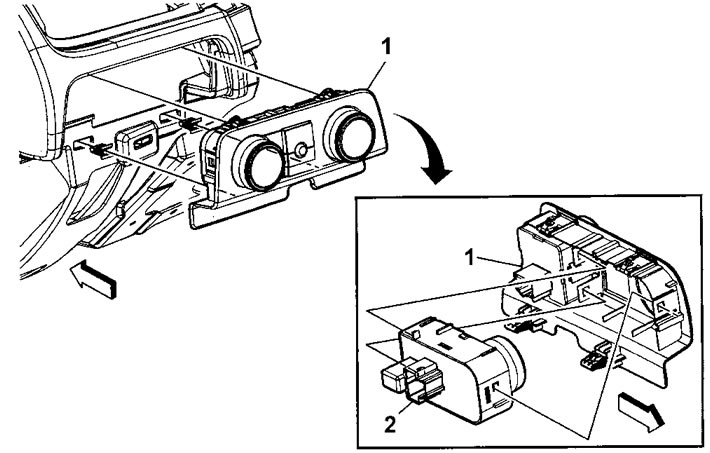
1. Remove the switch panel (1).
2. Disconnect the clips and remove the light control switch, backlight rheostat and interior light switch assembly (2).
The article was checked:
Vladimir Romannikov
This article is available at
russian
,
bulgarian
,
belarusian
,
ukrainian
,
serbian
,
croatian
,
romanian
,
polish
,
slovak
,
hungarian
Share information:
Previous articles
Tahoe 2 and 3: Lighting and lamps (since 2007)
Next articles
Removal and installation the brake pedal position sensor
Removal and installation the brake light switch
Removal and installation the light sensor
Removal and installation the interior lighting lamp
Removal and installation the local lighting lamp
Removal and installation the footrest lighting lamp
Removal and installation the doorway lighting lamp
See similar articles on the topic of Chevrolet cars:
Replacement of the control unit for external lighting and headlight corrector
Chevrolet Aveo T300 (2012-2018)
Instrument cluster lighting/headlamp leveling/mirror control switch
Chevrolet Captiva 1 (2006-2018)
Replacing the electric window control switch unit
Chevrolet Cruze 1 (2008-2016)
Replacing the contact group, immobilizer control unit and ignition switch
Chevrolet Lacetti 1 (2002-2009)
Ignition switch (lock)
Chevrolet Lanos T150 (2002-2009)
Control lamp block
Chevrolet Niva 1 (2002-2016)
Transfer case control switch (models with electric shift mechanism)
Chevrolet Trailblazer 1 (2001-2008, petrol)
Link in different formats to this page
Text
HTML
BB Code
Repair article cars Chevrolet Tahoe 2 and 3 (2000-2014): Removal and installation the lighting control switch: https://www.chevyman.ru/en/Tahoe/2/electrics/light-2/snyatie-i-ustanovka-pereklyuchatelya-upravleniya-osvescheniem
<a href="https://www.chevyman.ru/en/Tahoe/2/electrics/light-2/snyatie-i-ustanovka-pereklyuchatelya-upravleniya-osvescheniem">Chevrolet Tahoe 2 and 3 (2000-2014): Removal and installation the lighting control switch</a> - website article about repairs cars Chevrolet www.ChevyMan.ru
[url=https://www.chevyman.ru/en/Tahoe/2/electrics/light-2/snyatie-i-ustanovka-pereklyuchatelya-upravleniya-osvescheniem]Chevrolet Tahoe 2 and 3 (2000-2014): Removal and installation the lighting control switch[/url] - website article about repairs cars Chevrolet www.ChevyMan.ru
Visitor comments
No comments yet
How much will 42 + 43 =
Tahoe 2 and 3
(2000-2014)
General information
Vehicle characteristics
Vehicle device
Manual
Maintenance
Power unit
Engine repair
Engine overhaul
Cooling system
Injection and control system
Exhaust system
Engine electrical equipment
Transmission
Automatic gearbox 4L60, 4L65, 4L70
Automatic gearbox 6L50, 6L80, 6L90
Transfer case
Drive shafts and cardan
Front drive axle
Rear drive axle
Chassis
Car suspension
Steering
Brake system
Body (until 2007)
Exterior (external elements)
Interior (internal elements)
Doors, locks and windows
Heating and air conditioning
Security System (SRS)
Body (since 2007)
Exterior (external elements)
Doors, locks and windows
Interior (internal elements)
Electrical equipment
Electrical appliances (until 2007)
Lighting and lamps (until 2007)
Audio system (until 2007)
Electrical appliances (since 2007)
Lighting and lamps (since 2007)
Audio system (since 2007)
Wiring diagrams (2000-2005)
Wiring diagrams (2005-2007)
Wiring diagrams (since 2007)
Tahoe 1
(1992-2000)
General information
User manual
Maintenance
Power unit
Engine in a car
Engine removed
Cooling system
Heating and air conditioning
Fuel and exhaust systems
Decreased toxicity
Transmission
Manual gearbox
Automatic gearbox
Transfer case
Clutch and drive shafts
Chassis
Brake system
Car suspension
Steering
Body
Repair of body elements
Electrical equipment
Engine electrics
Equipment and devices
Electrical circuits
🛡️ For your security and to improve our service, this site uses cookies. You can disable them in your browser.
Accepted