


Contents: Turning on the system ↧ Volume control ↧ Switching modes ↧ "SEEK" button ↧ "PROG" button ↧
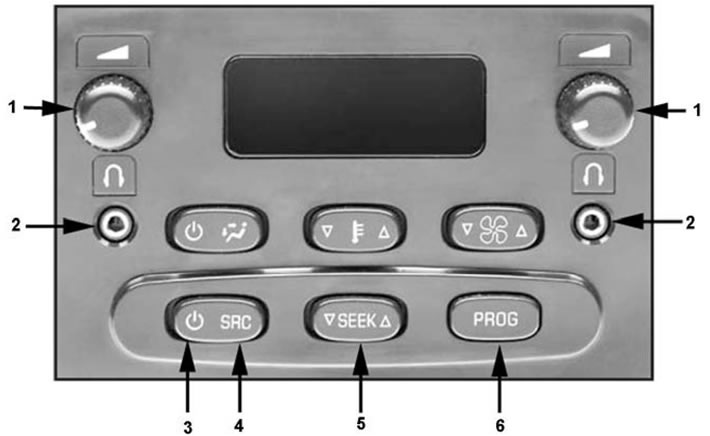
Audio system for rear passengers. 1 - volume control, 2 - headphone jack, 3 - audio system on/off button, 4 - search button ("SRC"), 5 - button for controlling the current operating mode of the front radio ("SEEK"), 6 - "PROG" button.
The audio system allows rear passengers to control the front radio to listen to radio stations or recordings from media loaded into the front radio via headphones. At the same time, the audio system for rear passengers allows the use of only those players that are not used by the front radio. For example, if the driver listens to the radio, then the rear passengers can only use the cassette player or CD player.
Note: The front radio always takes priority over the rear seat audio system.
The rear seat audio system is controlled using the panel shown in the illustration "Rear seat audio system".
Turning on the system
The audio system is switched on by pressing button (3). To switch the system off, press button (3) again.
Note:
- When the rear seat audio system is turned on, the rear seat speakers are automatically turned off.
- The rear seat audio system can be controlled even if the front seat radio is turned off.
Volume control
Volume control is performed by rotating the corresponding control (1). To adjust the volume of the left headphones, rotate the left control, for the right - the right control.
Switching modes
Switching between possible audio system operating modes (radio, cassette player or compact disc player) is carried out by successive pressing of the button (4) "SRC".
"SEEK" button
1. In the "Radio" mode, the "SEEK" button (5) is used to search for radio stations.
Note: If the front radio is also in Radio mode, it is not possible to search for radio stations from the rear audio control panel.
2. In the "Cassette Player" or "CD Player" mode, the "SEEK" button (5) is used to go to the previous/next chapter of a cassette or CD recording.
Note: If the front radio is also in the "Cassette Player" or "CD Player" mode, it is not possible to search for tracks on the cassette or CD.
"PROG" button
1. In the "Radio" mode, pressing the "PROG" button (6) switches between the stored radio stations of the front radio.
2. In the "Cassette Player" mode, the cassette is reversed using button (6).
3. In the "CD Player" mode, pressing the button (6) returns to the first recording on the disc.
4. If you listen to CDs through a CD changer, then button (6) switches between the discs loaded into the CD changer.
(The original text can be found on the website: «ChevyMan»)