ChevyMan.ru
Mazda Mitsubishi Toyota Land Rover Honda Kia Nissan
English Русский
Български
Беларускі
Український
Српски
Hrvatski
Română
Polski
Slovenský
Magyar
|
Articles | Sitemap | Contacts |


Home   Aveo   Captiva   Cruze   Lacetti   Lanos   Niva   Tahoe   Others  
Orlando 1 (2010-2018) Trailblazer 1 (2001-2008, petrol) Lumina 1 (1989-1994)
  • Home
  • Chevrolet
  • Orlando 1
  • Body
  • Exterior (external elements)
  • Front bumper

Front bumper (Chevrolet Orlando 1)

            0

The front bumper consists of a decorative plastic trim and a reinforcement. With minor impacts, as a rule, only the decorative cover breaks, which can be replaced separately. It is more convenient to perform the work of replacing the lining with an assistant in the following order:

1. We prepare the car for maintenance and repair.

2. Remove the front wheels. We hang out the front part of the car.

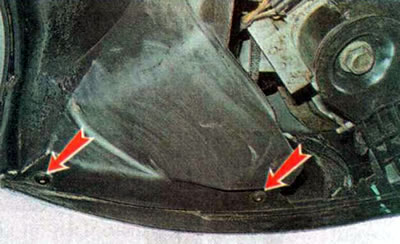
3. Using a TORX T20 key, unscrew the two screws that secure the upper mudguard liner to the bumper trim...
3. Using a TORX T20 key, unscrew the two screws that secure the upper mudguard liner to the bumper…


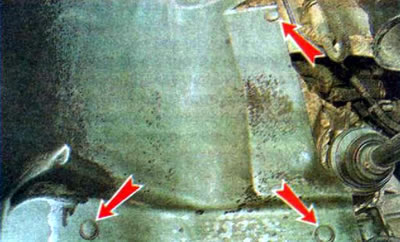
...and two lower mounting screws.

...and two lower mounting screws.


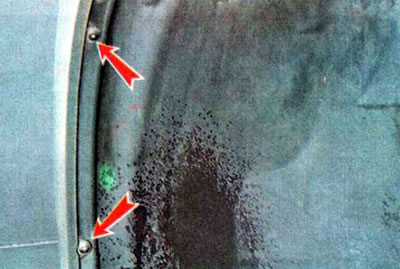
4. Pull out the retainers of the front part of the mudguard liner and remove the holders: one on top...
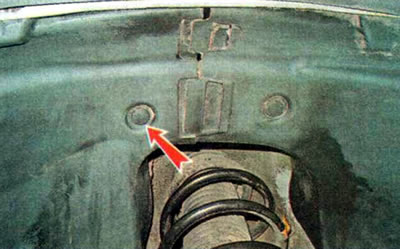
4. Pull out the retainers of the front part of the mudguard liner and remove the holders: one on…


...and three on the side.


...and three on the side.


5. Having disconnected the holder, remove the front part of the fender liner.
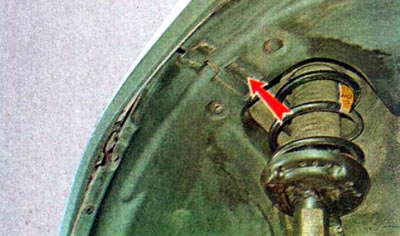
5. Having disconnected the holder, remove the front part of the fender liner.


6. Using a TORX T20 key, unscrew the screw securing the bumper trim to the wing.
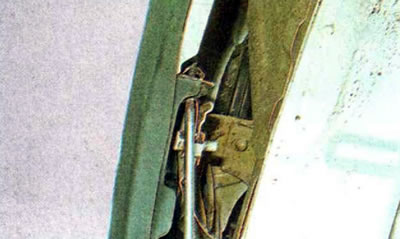
6. Using a TORX T20 key, unscrew the screw securing the bumper trim to the wing.


7. By pressing the clamps, we detach the wheel arch trim from the bumper trim.
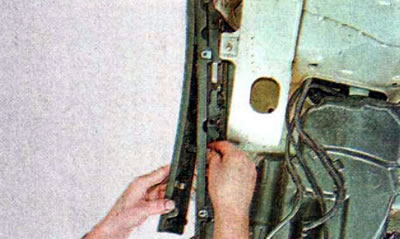
7. By pressing the clamps, we detach the wheel arch trim from the bumper trim.


8. Perform similar operations on the right side.


9. Pull out the clamps and remove the four holders of the bumper mudguard.
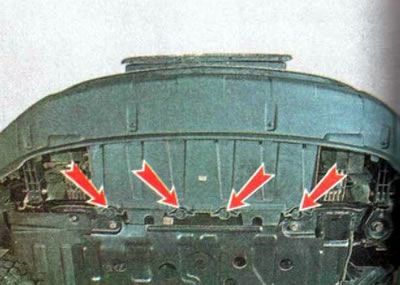
9. Pull out the clamps and remove the four holders of the bumper mudguard.


10. Using a 13 mm wrench, loosen the tightening bolts - one on the right and one on the left (the photo shows the left bolt).
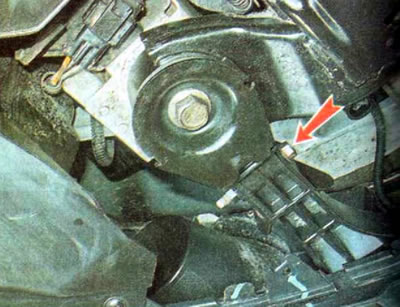
10. Using a 13 mm wrench, loosen the tightening bolts - one on the right and one on the left (the…


11. Having pulled out the clamps, we remove the eight holders of the radiator trim, and remove the trim
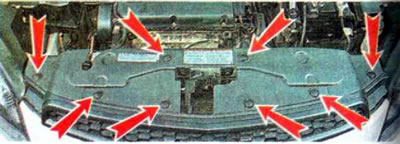
11. Having pulled out the clamps, we remove the eight holders of the radiator trim, and remove the…


12. Having pulled out the clamps, we remove two holders 1. Using a 10 mm socket wrench, we unscrew two bolts 2.
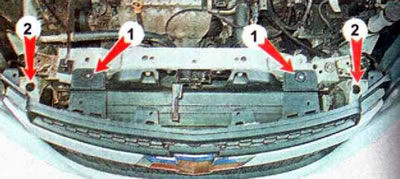


12. Having pulled out the clamps, we remove two holders 1. Using a 10 mm socket wrench, we unscrew…


Note: It is easier to remove the bumper cover with an assistant.


13. Alternately disconnect the left and right sides of the bumper trim from the side holders...
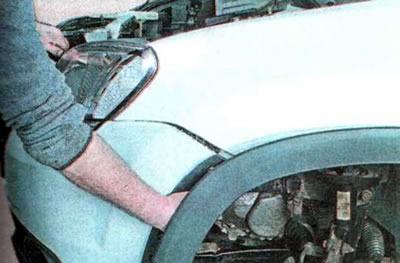
13. Alternately disconnect the left and right sides of the bumper trim from the side holders...


...and we take it off (if there are fog lights, disconnect the wiring harness connectors from them).
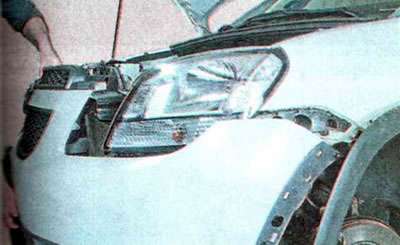
...and we take it off (if there are fog lights, disconnect the wiring harness connectors from them).


Note: In some cases, depending on the extent of damage, it is advisable to replace not the entire overlay, but only its upper or lower part, or perhaps only the upper or lower grille of the upper part of the overlay.


14. To separate the upper and lower parts of the bumper cover, use a Phillips screwdriver to unscrew 14 screws evenly spaced along the horizontal connector (indicated by the arrow).
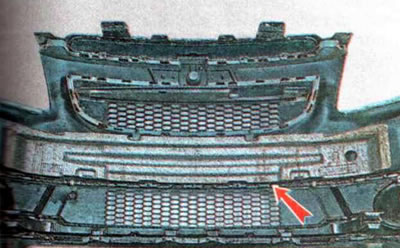
14. To separate the upper and lower parts of the bumper cover, use a Phillips screwdriver to…


15. To remove the top grille, use a Phillips screwdriver to unscrew six screws.
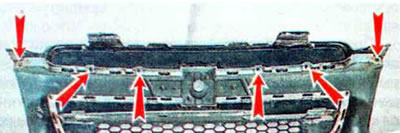
15. To remove the top grille, use a Phillips screwdriver to unscrew six screws.


16. To remove the lower grille, use a Phillips screwdriver to unscrew the four screws.
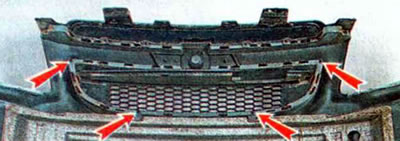
16. To remove the lower grille, use a Phillips screwdriver to unscrew the four screws.


17. When removing the energy-absorbing element of the pad, it is necessary to alternately compress it in the area of the clamps and remove it from the pad.
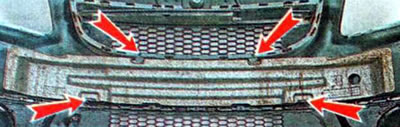


17. When removing the energy-absorbing element of the pad, it is necessary to alternately compress…


18. When installing the energy-absorbing element, it is necessary to align the holes in it with the protrusions on the pad.
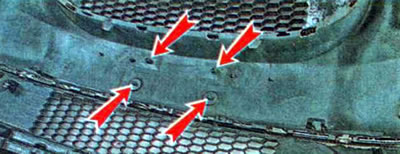
18. When installing the energy-absorbing element, it is necessary to align the holes in it with the…


19. To remove the plug or fog light, use a Phillips screwdriver to unscrew screw 2 and alternately squeeze the holder clamps 1.
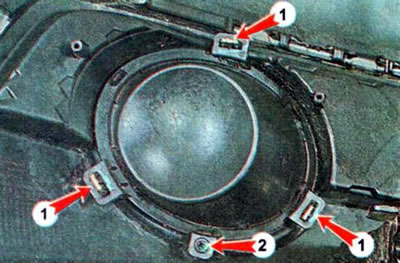
19. To remove the plug or fog light, use a Phillips screwdriver to unscrew screw 2 and alternately…


20. Install the parts in reverse order.

The article was checked: Vladimir Romannikov
This article is available at russian, bulgarian, belarusian, ukrainian, serbian, croatian, romanian, polish, slovak, hungarian

Share information:

Previous articles
Orlando 1: Exterior (external elements)
Next articles

Car body — description of the design
Rear view mirrors
Engine crankcase protection
Rear bumper
Paintwork repair


See similar articles on the topic of Chevrolet cars:
Front bumper Chevrolet Aveo T250 (2006-2011)
Front bumper trim Chevrolet Captiva 1 (2006-2018)
Removal and installation the front bumper Chevrolet Cruze 1 (2008-2016)
Removal the front bumper Chevrolet Lacetti 1 (2002-2009)
Removal the front bumper Chevrolet Lanos T150 (2002-2009)
Installation of beam and front bumper for assembly 55 Chevrolet Niva 1 (2002-2016)
Front bumper air deflector Chevrolet Tahoe 2 and 3 (2000-2014)
Link in different formats to this page


Visitor comments

No comments yet


How much will 11 + 19 =


Orlando 1 (2010-2018) 
  • General information
  • Introduction to manual
  • User manual
  • Maintenance
  • Troubleshooting
  • Power unit
  • Engine repair
  • Fuel and control system
  • Cooling and lubrication system
  • Ignition system
  • Transmission
  • Clutch
  • Gearbox
  • Drive shafts
  • Chassis
  • Car suspension
  • Steering
  • Brake system
  • Body
  • Exterior (external elements)
  • Doors, locks and windows
  • Electrical equipment
  • Equipment and devices
  • Windscreen wipers
  • Power devices
  • Electrical diagrams


Trailblazer 1 (2001-2008) 
  • General information
  • User manual
  • Troubleshooting
  • Maintenance
  • Power unit
  • Engine in a car
  • Engine overhaul
  • Cooling and heating
  • Fuel and exhaust system
  • Engine electrical equipment
  • Engine control
  • Transmission
  • Automatic gearbox
  • Transfer case
  • Drive shafts and cardan
  • Chassis
  • Brake system
  • Car suspension
  • Steering
  • Body
  • Exterior (external elements)
  • Interior (internal elements)
  • Doors, locks and windows
  • Electrical equipment
  • Equipment and devices
  • Electrical circuits


Lumina 1 (1989-1994) 
  • General information
  • Maintenance
  • Power unit
  • Engine 3.1L V6
  • Engine 3.8L V6
  • Engine overhaul
  • Cooling system
  • Power and exhaust system
  • Fuel injection
  • Engine electrical equipment
  • Reduced exhaust gas toxicity
  • Transmission
  • Automatic gearbox
  • Drive shafts
  • Chassis
  • Brake system
  • Car suspension
  • Steering
  • Body
  • Heating and air conditioning
  • Repair of body elements
  • Doors, covers and windows
  • Interior (internal elements)
  • Electrical equipment
  • Equipment and devices
  • Electrical circuits


ChevyMan.ru © 2017-2026 · Mobile version · Feedback · Site search · Interesting to read · Sitemap: EN BG BY UA RS HR RO PL SK HU

Aveo 2003-2008 · Aveo 2006-2011 · Aveo 2012-2018 · Captiva 2006-2018 · Cruze 2008-2016 · Lacetti 2002-2009 · Lanos 2002-2009 · Niva 2002-2016 · Tahoe 1992-2000 · Tahoe 2000-2014 · Lumina 1 1989-1994 · Trailblazer 1 2001-2008 · Orlando 1 2010-2018 ·
🛡️ For your security and to improve our service, this site uses cookies. You can disable them in your browser.