
ChevyMan.ru
Mazda Mitsubishi Toyota Land Rover Honda Kia Nissan
English Русский
Български
Беларускі
Український
Српски
Hrvatski
Română
Polski
Slovenský
Magyar
|
Articles | Sitemap | Contacts |


Home   Aveo   Captiva   Cruze   Lacetti   Lanos   Niva   Tahoe   Others  
Cruze 1 (2008-2016)
  • Home
  • Cruze
  • J300 (2008-2016)
  • Chassis
  • Brake system
  • Replacing the front wheel brake caliper assembly

Replacing the front wheel brake caliper assembly (Chevrolet Cruze J300)

            0

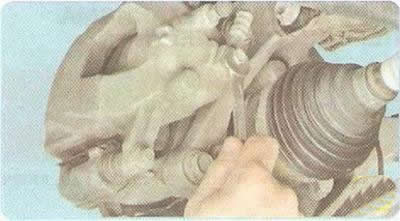
1. Remove the front wheel from the side of the caliper being replaced.

1. Remove the front wheel from the side of the caliper being replaced.


2. Unscrew the union bolt...
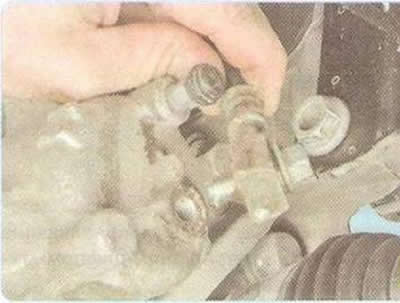
2. Unscrew the union bolt...


3. ...and disconnect the brake hose from the caliper.

Helpful Hint: Place a container underneath to catch any remaining brake fluid from the hose and cylinder.

Helpful Hint: Place a container underneath to catch any remaining brake fluid from the hose and…


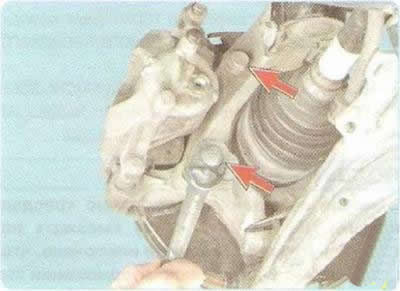
4. Remove the bolts securing the shoe guide to the steering knuckle.


4. Remove the bolts securing the shoe guide to the steering knuckle.


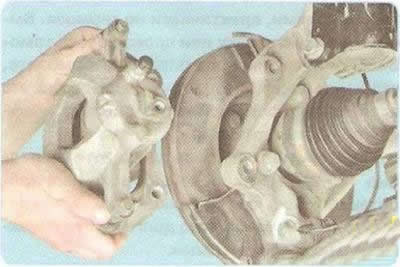
5. Remove the caliper assembly.

6. Install the caliper in the reverse order of removal. Apply anaerobic thread locker to the threads before installing the shoe guide bolts to the steering knuckle. Use only new copper washers when installing the brake hose.

7. After installation, restore the brake fluid level in the master cylinder reservoir and bleed the air from the brake hydraulic system (see "Replacing brake fluid").

(The original article is on the website: «CHEVYMAN.ru»)

The article was checked: Vladimir Romannikov
This article is available at russian, bulgarian, belarusian, ukrainian, serbian, croatian, romanian, polish, slovak, hungarian

Share information:

Previous articles
Cruze 1: Brake system
Next articles

Replacing the brake pads of the front wheel brake mechanism
Removal and installation the brake pedal
Replacing brake lines
Replacing brake hoses
Replacing the master brake cylinder
Replacing the brake disc of the front wheel brake mechanism
Replacing the brake pads of the rear wheel brake mechanism
Replacing the rear wheel brake caliper assembly
Replacing the brake disc of the rear wheel brake mechanism
Adjusting the parking brake


See similar articles on the topic of Chevrolet cars:
Replacing the front wheel brake caliper Chevrolet Aveo T300 (2012-2018)
Front wheel brake hose Chevrolet Captiva 1 (2006-2018)
Replacing the front wheel drive oil seal Chevrolet Lacetti 1 (2002-2009)
Replacing the protective cover and sealing ring of the front wheel brake piston Chevrolet Lanos T150 (2002-2009)
Replacing grease in front wheel hub bearings Chevrolet Niva 1 (2002-2016)
Location of front brake assemblies and units Chevrolet Tahoe 1 (1992-2000)
Replacing the front brake pads Chevrolet Orlando 1 (2010-2018)
Link in different formats to this page


Visitor comments

No comments yet


How much will 33 + 14 =


Cruze 1 (2008-2016) 
  • General information
  • User manual
  • Troubleshooting
  • Maintenance
  • Power unit
  • Engine repair
  • Lubrication system
  • Cooling system
  • Exhaust system
  • Supply system
  • Control system
  • Transmission
  • Clutch
  • Car gearbox
  • Front wheel drives
  • Chassis
  • Front suspension
  • Rear suspension
  • Steering
  • Brake system
  • Body
  • Exterior (external elements)
  • Interior (internal elements)
  • Doors, covers and windows
  • Heating and air conditioning
  • Security systems
  • Electrical equipment
  • Equipment and devices
  • Power devices
  • Lighting and signaling
  • Electrical circuits


ChevyMan.ru © 2017-2026 · Mobile version · Feedback · Site search · Interesting to read · Sitemap: EN BG BY UA RS HR RO PL SK HU

Aveo 2003-2008 · Aveo 2006-2011 · Aveo 2012-2018 · Captiva 2006-2018 · Cruze 2008-2016 · Lacetti 2002-2009 · Lanos 2002-2009 · Niva 2002-2016 · Tahoe 1992-2000 · Tahoe 2000-2014 · Lumina 1 1989-1994 · Trailblazer 1 2001-2008 · Orlando 1 2010-2018 ·
🛡️ For your security and to improve our service, this site uses cookies. You can disable them in your browser.