


2. When the engine is first started and the vehicle begins to move, the Stabilitrak system performs certain diagnostic checks to ensure that there are no malfunctions. You may feel or hear the system working, but this is normal.
3. If driving conditions delay system initialization, the Driver Information Center display will show (if available) the message STABILITRAK NOT READY may appear (stabilitrak system is not ready). This is a normal phenomenon. Your car does not require maintenance.
4. If none of the above messages appear, then the system diagnostics have been successful and the system is ready to help you maintain trajectory control when driving on a slippery road.
5. If the car starts to move in a direction different from the one set by the driver, the Stabilitrak dynamic stabilization system will be activated. This system automatically helps you regain control of your vehicle. The traction control system starts to function if the system detects that the wheels are slipping. If the system detects that any wheel is slipping or starting to lose traction, it selectively applies the brakes and/or reduces engine power to limit wheel slip. You may feel or hear the system working, but this is normal.
6. When the Stabilitrak system is turned on, the Stabilitrak indicator will flash (see illustration).
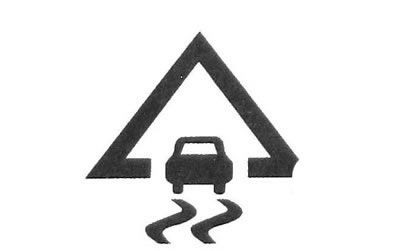
2.6 Stability System Indicator
7. Normally you should leave the system in its normal on state, however if your vehicle is stuck in mud, sand or snow, make sure the system is off.
It may be necessary to disable the system when driving in extreme off-road conditions where wheel spin is required.
8. Press the Stabilitrak system button (see illustration), located on the automatic transmission selector lever to switch the system mode. You can choose one of the following modes:
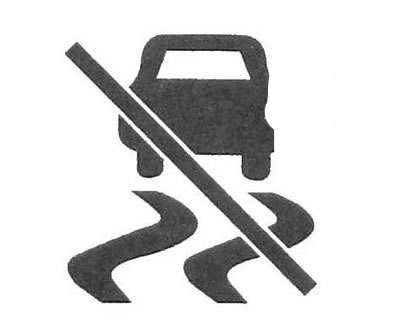
2.8 Stabilitrak system button
a) Stabilitrak On (stabilitrak system enabled). The system turns on automatically when you start the engine. The system indicator does not illuminate and there are no warning messages on the driver information center display.
b) Traction Control Off (Traction control system is disabled). Press the Stabilitrak button briefly to activate the system's limited operation mode. The Stabilitrak indicator will come on and remain on. On the driver information center display (if available) the message TRACTION CONTROL OFF will appear (Traction control system is disabled).
c) The dynamic stabilization system and the braking function of the traction control system are operational. At the same time, the algorithm of the engine control system changes. The system may apply brakes to the wheels more frequently.
9. If the system detects excessive wheel slip, the indicator will flash to warn you of possible damage to the transfer case. On the driver information center display (if available) the message STABILITRAK ACTIVE will appear (Stabilitrak system activated).
Caution: Do not allow excessive wheel spin if the traction control system, anti-lock brake system, or brake system malfunction indicator lights are on and the SERVICE STABILITRAK message appears in the display (stabilitrak system is faulty). Otherwise, you may damage your vehicle's transfer case. The manufacturer's warranty does not cover any possible damage.
10. To cancel this mode, briefly press the same button again. Press and hold the Stabilitrak button for more than five seconds to turn off the system and partially disable the traction control system. When the system is disabled, the Stabilitrak indicator lights up and the message STABILITRAK OFF appears on the Driver Information Center display (Stabilitrak system is disabled).
11. When the Stabilitrak system is turned off, the brake function will be retained, but the engine management function will be deactivated.
12. Even with Stabilitrak turned off, you may feel or hear the traction control system engaging.
If the system detects excessive wheel slip, the indicator will flash to alert you to possible damage to the transfer case. On the driver information center display (if available) the message STABILITRAK ACTIVE will appear (Stabilitrak system activated).
13. To reactivate the system, press the same button again. Under certain conditions, the system can be activated even on dry roads. If this happens, a temporary decrease in the vehicle's dynamic performance is normal. You may need to disable the system when driving in extreme off-road conditions where wheel spin is required.
14. When the transfer case is in 4WD mode with low range, the Stabilitrak system is automatically disengaged. When the system is disabled, the Stabilitrak indicator lights up and the message STABILITRAK OFF appears on the Driver Information Center display (Stabilitrak system is disabled).
15. If the Stabilitrak system is turned on while the cruise control system is on, the cruise control system will be automatically turned off. The Stabilitrak system indicator will flash. Once normal driving conditions have been restored, you can turn the cruise control system back on.
16. The Stabilitrak system can also automatically turn off if a fault occurs in the system. If the problem persists after restarting the engine, contact your dealer for vehicle service. The Stabilitrak indicator will come on and remain on. The Stabilitrak system malfunction indicator will also come on.
17. SERVICE STABILITRAK (Dynamic stabilization system malfunction) will appear on the driver information centre display if a fault is detected in the dynamic stability system. Cm. "Driver Information Center Messages" higher.