


Traction Control System (TCS)
1. The traction control system (TCS) is designed to automatically prevent wheel slippage when starting off, accelerating and driving on slippery surfaces and ensures stable vehicle control. However, it is worth keeping in mind that on slippery road surfaces, even with the TCS system operating, the driver cannot always control the vehicle at high speed.
2. The traction control system is activated immediately after the ignition key is turned to the "ON" position.
If the traction control system is activated while driving, the indicator will light up on the multifunction display "TRACTION ACTIVE", indicating that wheel slip is being prevented.
Note: When StabiliTrak is disabled, the traction control system prevents wheel spin only by changing the braking force on the wheels (the engine output power will not change), which can lead to overheating of the brake mechanisms.
3. Prolonged activation of the traction control system or braking at high speed may cause the system to switch off. In this case, the indicator will light up on the multifunction display "TRACTION SYS LIMITED" and wheel slip will be prevented only by controlling the engine output. Indication "TRACTION SYS LIMITED" will go out when the brakes cool down (in two or more minutes).
Automatic stability control (ASC)
1. Automatic stability control (ASC) improves vehicle stability when lateral slippage could cause loss of stability (for example, when turning the steering wheel sharply to avoid an obstacle), by regulating engine output and all-wheel brake action to suppress lateral slip.
Please note: The ASC system's ability to maintain directional stability is limited, so drive carefully, taking into account road conditions, to avoid accidents.
Note: When driving starts, the StabiliTrak system is diagnosed. The ASC system starts working when the vehicle reaches a speed of 32 km / h or after about 3 km.
2. If the StabiliTrak system is not activated or has not been activated while driving, the multi-function display will show "STABILITY SYS DISABLED" or "SERVICE STABILITY".
Note: message "STABILITY SYS DISABLED" may appear if sharp braking, acceleration or maneuvering was performed during the first three kilometers. In this case, stop the car, turn off and turn on the engine again. After that, the message should go out.
3. If a warning message appears on the multifunction display while the vehicle is moving "STABILITY SYS ACTIVE", then the ASC system operates to prevent wheel slippage. In this case, it is recommended to ease off the accelerator pedal and maintain a moderate driving speed.
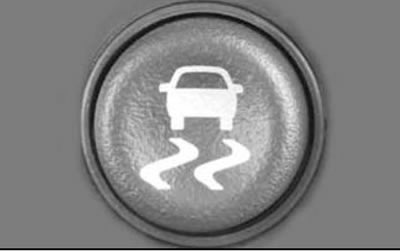
4. There are situations when the StabiliTrak system must be turned off in order to continue driving (for example, when driving on sand, mud or snow). To turn off the StabiliTrak system, press the switch shown in the image below, which will illuminate the indicator on the multifunction display "STABILITY SYS DISABLED".
Note: When StabiliTrak is disabled, the traction control system prevents wheel spin only by changing the braking force on the wheels (the engine output power will not change), which can lead to overheating of the brake mechanisms.
[Information taken from the official website: ChevyMan.ru]