


The SDUEP "Norma" is intended for:
- remote locking/unlocking of door locks with simultaneous activation/deactivation of the vehicle security mode;
- locking all doors by turning the key in the driver's door lock;
- locking/unlocking all doors with a button on the driver's door;
- activation of alarms when vehicle security zones are violated;
- turning off the alarm remotely or after turning on the ignition with your key.
The SDUEP "Norma" consists of the electrical package control unit 1, Figure 7-52, and the remote control (RC), Figure 7-49.
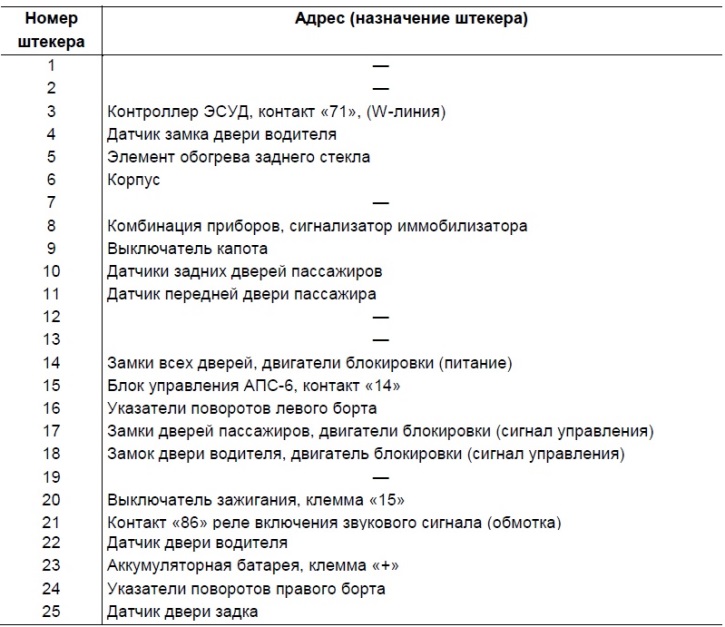
The connection diagram of the SDUEP "Norma" is shown in Figure 7-50. The addresses of the output plugs of the control unit of the electrical package "Norma" are given in Table 7-16.
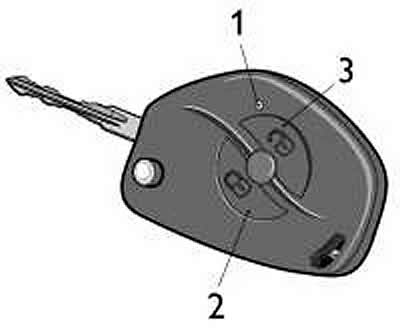
Figure 7-49. Remote control:
1 - Remote control;
2 - door lock button;
3 - door lock release button.
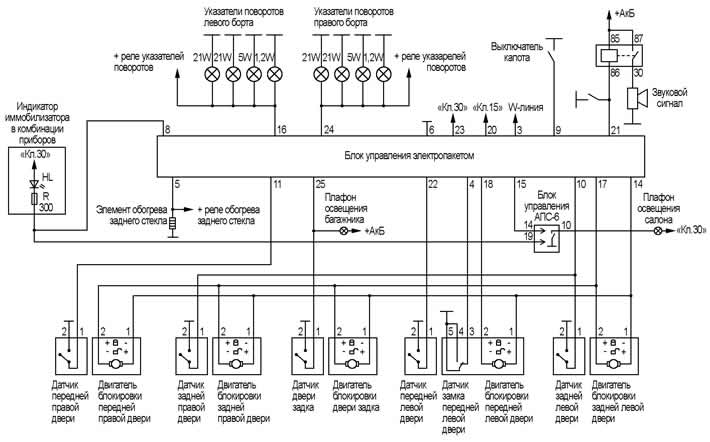
Figure 7-50. Connection diagram of the SDUEP "Norma".
Table 7-16. Addresses of the electrical package control unit output plugs
The remote control combines the following functions:
- ignition key;
- door lock keys;
- working key of immobilizer APS-6;
- remote control for electrical package.
To operate the remote control as part of the SDUEP, it must be trained using the training key from the immobilizer (see "Training the immobilizer"). After training, the remote control is also a working key for the immobilizer and is used to remove the prohibition of starting the engine.
Functions of the SUEP "Norma"
Locking door locks and turning on security mode using the remote control
To lock the door locks and turn on the security mode, press the lock button on the remote control, Figure 7-49. In this case, the side door locks and the rear door lock (trunk lids) (in a variant design), will be blocked, and the security mode will be activated at the same time, which is confirmed by a single flashing of the direction indicators and a slow flashing of the immobilizer indicator in the instrument cluster.
If any door or hood is opened when the security mode is activated, the direction indicators will flash three times and a single sound signal will be emitted. In order to include open zones in the security zone, close them. The system will behave similarly if the door lock overheating protection is triggered, if the locks are locked/unlocked repeatedly within a short period of time. In this case, wait for a while, after which the system will fully recover.
Blocking locks without turning on the security mode with the remote control
To lock the door locks with the remote control without turning on the security mode, press the lock button twice or hold it down for a while. In this case, the doors will be locked without turning on the security mode. This lock is accompanied by three flashes of the direction indicators.
If the security mode is already on, double-pressing the lock button or holding it down will turn off the security mode, while the door locks will remain locked. Turning off the security mode is accompanied by a double flashing of the direction indicators.
Unlocking door locks and disabling security mode using the remote control
To unlock the driver's door and turn off the security mode using the remote control, press the unlock button. The driver's door lock will be unlocked, and turning off the security mode will be accompanied by a double flashing of the direction indicators.
To unlock the passenger doors, press the unlock button on the remote control again.
If after unlocking the doors and disabling the security mode none of the doors are opened and the ignition is not turned on, then after 25 seconds the doors will be locked again and the system will automatically switch to the security mode. The automatic transition of the system to the security mode with the doors locked is accompanied by rapid flashing of the immobilizer indicator in the instrument cluster.
Attention! If the security mode is not switched off with the remote control due to a drop in battery voltage in the remote control, it is possible to open the door with a key. In this case, the alarm will be triggered, which can be switched off by turning on the ignition. Further operation of the car will be carried out without the possibility of switching on the alarm.
Central locking and unlocking of door locks from the passenger compartment
To lock all doors from inside the vehicle, press the lock button in the driver's door.
To unlock the driver's door lock, lift the lock button on the driver's door.
To unlock all doors from inside the vehicle, press the unlock button on the remote control.
The central locking has protection for door locks from overheating. If locking and unlocking of locks occurs repeatedly within a short period of time, the system stops responding to button presses. If this happens, do not press the button for a while, after which the system will fully recover. For safety reasons, the last command executed is always the unlock command.
Central door locking from outside the car
To lock all doors from the outside of the car, turn the key in the driver's door lock counterclockwise. Turning the key clockwise does not centrally unlock all doors, only the door that is currently open is unlocked.
System operation in security mode
After turning on the security mode, the system monitors the status of the following security zones:
- side doors;
- hood;
- tailgate;
- ignition switch;
- driver's door lock;
- battery voltage;
- additional sensor (not included in the factory package).
If any of the following actions occur in the security mode:
- opening any side door;
- opening the hood;
- opening the tailgate;
- turning on the ignition without using "your" key;
- driver's door unlock;
- connecting the battery after disconnecting it;
then the alarm is activated in the form of a light signal with direction indicators and an audible signal with the standard sound signal of the car for about 30 seconds.
Pressing any button on the remote control once when the system is in alarm mode stops the alarm signals, but the system remains in the security mode. The security mode is turned off after pressing the unlock button on the remote control.
Resynchronization of remote control codes
In cases where the remote control buttons are pressed outside the radio channel coverage area, the "floating" code counter in the remote control goes out of synchronization with the counter in the system control unit. If the number of remote control button presses outside the system signal reception area exceeds 1000, the system will stop responding to remote control commands. In this case, the immobilizer training procedure should be repeated.
Replacing a faulty electrical package control unit
In case of a malfunction of the electrical package control unit, after replacing it, carry out the immobilizer training procedure with "your" training key.
Diagnostics of the SDUEP "Norma"
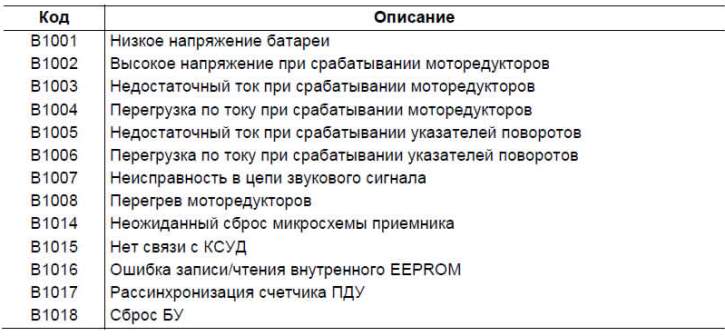
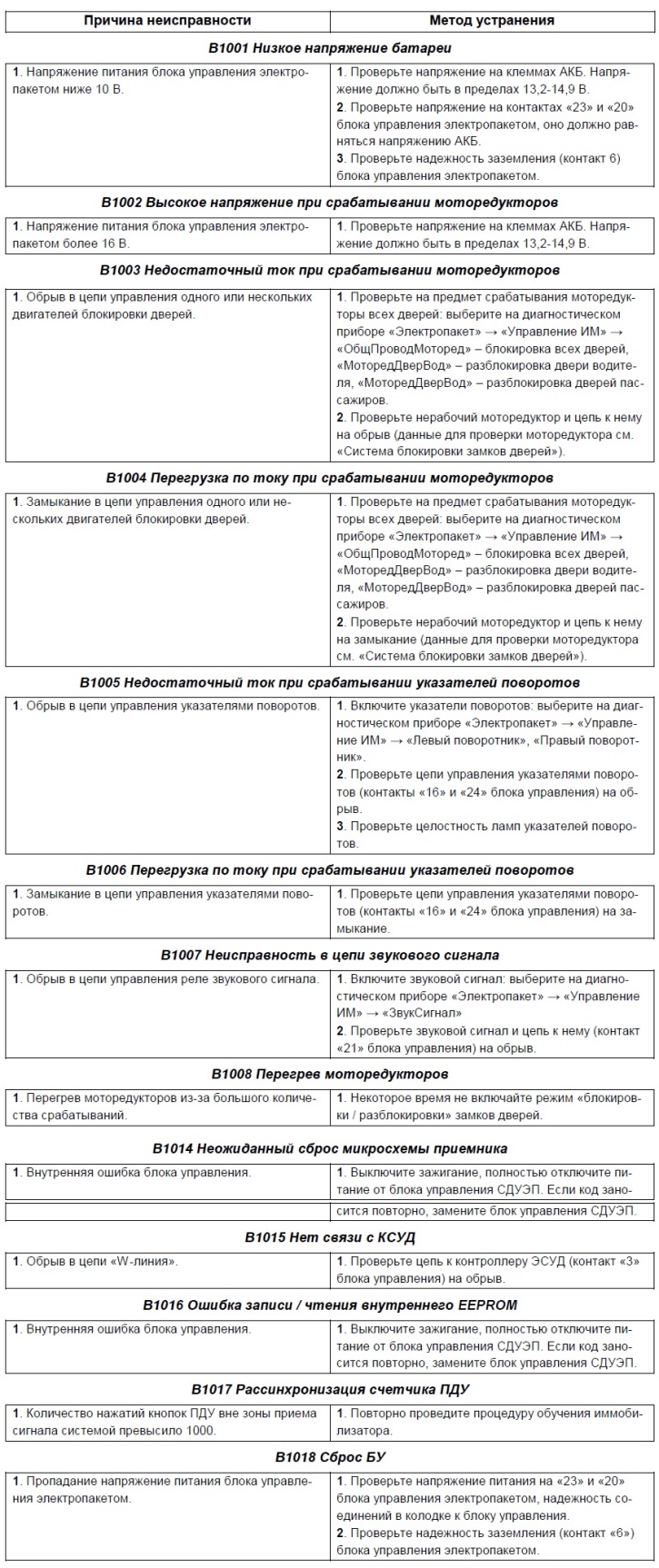
In the event of a malfunction in the system, the corresponding malfunction code is entered into the memory of the electrical package control unit. The list of malfunction codes of the ECU is given in Table 7-17.
Table 7-17. List of fault codes for the SDUEP
For diagnostics of the SDUEP, the diagnostic device DST-2M or DST-10(12) is used. When selecting the "Electropackage" system, the diagnostic device allows viewing fault codes in the "Faults" mode, system parameters in the "Parameters" mode, and also controlling individual devices (locking gear motors, horn relays) in the "IM Management" mode.
Causes of malfunctions and methods of their elimination
[The text of the article was obtained from the website CHEVYMAN]