


Contents: Cadillac Escalade ↧ Chevrolet Tahoe, Avalanche: 4WD… ↧ Chevrolet Tahoe: AWD with StabiliTrak ↧
Attention:
- To avoid damage to transmission components, partial loading of 4WD models is prohibited (by raising only one of the vehicle's axles).
- Use tires of the same size, design and load capacity as the original tires of the vehicle, since using tires of a different type may interfere with the normal operation of the all-wheel drive control system and the activation of the safety mechanism!
Cadillac Escalade
Your car is equipped with a four-wheel drive system with active torque distribution between the front and rear axles, which allows you to increase the vehicle's cross-country ability. Torque distribution occurs depending on:
- vehicle driving conditions (off-road, slippery or normal road);
- vehicle driving mode (acceleration, braking or uniform movement);
- engine loads;
- and so on.
The torque ratio between the front and rear wheels is not a constant value, but changes depending on driving conditions. The ratio can vary from 0:100 (front: back) up to 50:50. Thus, the torque on the front wheels cannot exceed the torque supplied to the rear wheels.
The system sets the torque ratio of 0:100 only when driving at low speed on good roads. In other cases, the system supplies torque to the front wheels and in difficult driving conditions the torque ratio reaches 50:50 (front:rear).
Chevrolet Tahoe, Avalanche: 4WD system
The all-wheel drive system allows you to drive the vehicle using one of four wheel drive modes:
- 1. The drive is carried out only on the rear wheels (switch "2↑" is pressed).
- 2. The drive is carried out on the front and rear wheels (switch "4↑" is pressed).
- 3. The drive is carried out on the front and rear wheels with the downshift engaged (the "4↓" switch is pressed).
- 4. The wheel drive is controlled automatically (the "AUTO 4WD" switch is pressed).
When one of the all-wheel drive control switches is pressed, a corresponding signal is sent to the 4WD electronic control unit, after which the control system switches to the specified mode.
4WD system operating modes
The 4WD system operating mode is changed using the switches located to the left of the instrument cluster. The indicator on the switch will light up.
Note: The indicators on the 4WD control switches come on when the ignition is turned on and go out after a few seconds. Continuous flashing of the indicators indicates a fault in the 4WD system.
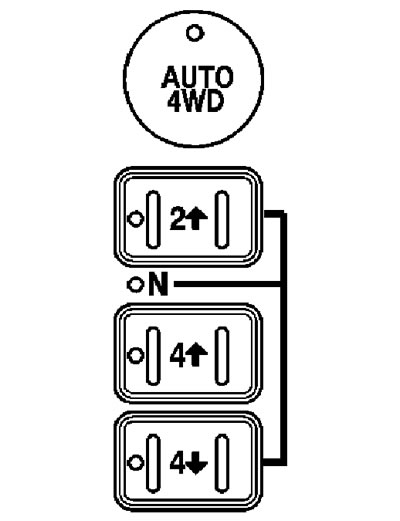
2WD mode
1. The drive is carried out only on the rear wheels. It is recommended to use it in normal driving conditions (on good roads). Driving in this transmission operating mode provides the greatest fuel economy, the best vehicle control, and minimal wear on tires and transmission components.
2. Switching to the "2WD" mode is done by pressing the "2↑" switch regardless of the driving speed (except switching from 4WD LO mode).
4WD AUTO mode
1. This wheel drive mode is used when driving on roads with variable conditions. In the "4WD AUTO" mode, the front axle is connected, but the torque is transmitted completely to the rear wheels. The all-wheel drive will only be engaged when traction is reduced. This mode is also economical.
2. Switching to the "4WD AUTO" mode is done by pressing the "4WD AUTO" switch regardless of the driving speed (except switching from 4WD LO mode). The indicator on the switch will flash until the mode switching is completed.
4WD mode
1. The drive is carried out on the front and rear wheels. It is recommended to use it when driving on wet, icy or snow-covered roads. This position provides a more stable ride.
2. Switching to the "4WD" mode is done by pressing the "4WD" switch regardless of the driving speed (except switching from 4WD LO mode). The indicator on the switch will flash until the mode switching is completed.
4WD LO mode
1. The drive is carried out on the front and rear wheels with a reduction gear. This mode is used to obtain maximum power and traction: when climbing steep slopes, descending steep slopes and when driving on bad roads, for example, covered with mud.
Warning: It is not recommended to use the all-wheel drive mode when driving in normal conditions. Using the all-wheel drive will result in increased fuel consumption and tire wear.
2. The "4WD LO" mode is activated when the key in the lock is set to the "ON" position and the vehicle is stationary (or moves at a speed of less than 5 km/h) and the automatic transmission selector is set to the "N" position. Before moving the automatic transmission selector to the start position, wait until the indicator on the "4↓" switch goes out.
Caution: moving the automatic transmission selector to the drive position before the indicator on the "4↓" switch goes out may result in damage to the transfer case.
Note: If you press the "4↓" switch while driving or when the automatic transmission selector is not in the "N" position, the indicator on the switch will flash for 30 seconds and then the previous wheel drive mode will be engaged.
3. Switching the all-wheel drive control system from the "4WD LO" mode to any other mode is carried out when the vehicle is stationary (or moves at a speed of less than 5 km/h), the automatic transmission selector is set to the "N" position and the ignition switch is in the "ON" position. Before moving the automatic transmission selector to the start position, wait until the indicator on the selected mode switch goes out.
"NEUTRAL" mode
1. Switch to "NEUTRAL" mode only when towing the vehicle.
Caution: When setting the "NEUTRAL" mode when the vehicle is parked, always apply the parking brake, as the vehicle may roll even when the automatic transmission selector is set to the "P" position.
2. The "NEUTRAL" mode is switched on as follows:
- a) Make sure the vehicle is stationary.
- b) Apply the parking brake.
- c) Turn on the engine or turn the ignition key to the "ON" position.
- d) Set the automatic transmission selector to position "N".
- e) Turn on the "2WD" mode.
- e) Press and hold the "2↑" and "4↓" switches simultaneously for 10 seconds. When the "NEUTRAL" mode is turned on, the red indicator next to the "N" symbol will light up.
- g) If the engine is running, make sure that the transmission is in "N" mode by moving the selector lever to the "R" position for one second, then to the "D" position for one second.
- c) Turn off the ignition.
- i) Set the automatic transmission selector to position "P".
3. To turn off the "NEUTRAL" mode, do the following:
- a) Apply the parking brake and press the brake pedal.
- b) Move the automatic transmission selector to the "N" position and turn the ignition key to the "ON" position (engine off).
- c) Select the required wheel drive mode (2WD, 4WD, AUTO 4WD or 4WD LO).
- d) When the 4WD system switches modes, the red indicator next to the "N" symbol will go out. You can then start the engine and drive off.
Chevrolet Tahoe: AWD with StabiliTrak
The AWD system is similar to the 4WD system, the difference being the absence of a switch for connecting or disconnecting the front axle. The wheel drive is controlled automatically, depending on road conditions.
AWD system operating modes
The AWD mode switches are located to the left of the instrument cluster. When you press the switch, the indicator on it will light up.
Note: The indicators on the AWD control switches come on when the ignition is turned on and go out after a few seconds. Continuous flashing of the indicators indicates a fault in the AWD system.
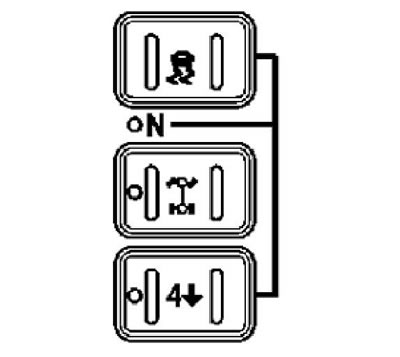
StabiliTrak mode
By pressing the switch
 the StabiliTrak system is switched on/off, and the transfer case is switched to "NEUTRAL" mode.
AWD mode
In AWD mode, torque is distributed between all wheels, depending on road conditions.
4LO mode
1. The wheel speed is maintained by engine braking. This mode is used to obtain maximum power and traction: when climbing steep slopes, descending steep slopes and when driving on poor roads, such as those covered in mud.
2. The "LO" mode is activated when the key in the lock is set to the "ON" position and the car is stationary (or moves at a speed of less than 5 km/h) and the automatic transmission selector is set to the "N" position. Before moving the automatic transmission selector to the start position, wait until the indicator on the "4↓" switch goes out.
Caution: moving the automatic transmission selector to the drive position before the indicator on the "4↓" switch goes out may result in damage to the transfer case.
Note: If you press the "4↓" switch while driving or when the automatic transmission selector is not in the "N" position, the indicator on the switch will flash for 30 seconds and then the previous wheel drive mode will be engaged.
3. Switching the all-wheel drive control system from the "LO" mode to any other is carried out when the vehicle is stationary (or moves at a speed of less than 5 km/h), the automatic transmission selector is set to the "N" position and the ignition switch is in the "ON" position. Before moving the automatic transmission selector to the start position, wait until the indicator on the selected mode switch goes out.
"NEUTRAL" mode
1. Switch to "NEUTRAL" mode only when towing the vehicle.
Caution: When setting the "NEUTRAL" mode when the vehicle is parked, always apply the parking brake, as the vehicle may roll even when the automatic transmission selector is set to the "P" position.
2. The "NEUTRAL" mode is switched on as follows:
- a) Make sure the vehicle is stationary.
- b) Apply the parking brake.
- c) Turn on the engine or turn the ignition key to the "ON" position.
- d) Set the automatic transmission selector to position "N".
- e) Turn on the "AWD" mode.
- e) Simultaneously press and hold the switches "" and "4↓" for 10 seconds. When the "NEUTRAL" mode is turned on, the red indicator next to the "N" symbol will light up.
- g) If the engine is running, make sure that the transmission is in "N" mode by moving the selector lever to the "R" position for one second, then to the "D" position for one second.
- c) Set the automatic transmission selector to position "P".
- i) Turn off the ignition.
3. To turn off the "NEUTRAL" mode, do the following:
- a) Apply the parking brake and press the brake pedal.
- b) Move the automatic transmission selector to the "N" position and turn the ignition key to the "ON" position (engine off).
- c) Select the required AWD operating mode.
- d) When the AWD system switches modes, the red indicator next to the "N" symbol will go out. You can then start the engine and start driving.
(The article is reprinted from the website: «ChevyMan.ru»)