


Listening to the radio
VOLUME: This knob turns on the radio and adjusts the volume, clockwise - louder, counterclockwise - quieter.
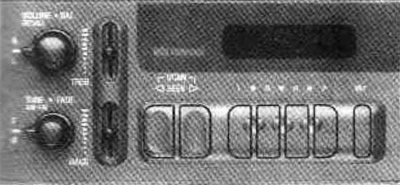
RECALL: When the radio is playing, press the button to select the desired frequency.
Search radio stations
AM-FM: Press the bottom button to select between AM and FM. The display will show the selection.
TUNE: Turn the lower button to tune to a radio station.
SEEK: Press the right arrow to tune to the next higher frequency radio station. Press the left arrow to tune to the next lower frequency radio station.
SCAN: Press both SEEK buttons to listen to a radio station for a few seconds. SCAN will appear on the display. Press VOLUME or both SEEK buttons to stop scanning.
PUSHBUTTONS: Four numbered buttons will allow you to find your favorite radio station. You can set 14 radio stations (seven AM and seven FM). To do this:
- 1. Turn on the radio
- 2. Press AM-FM to select the frequency
- 3. Tune to the desired station
- 4. Press SET (SET will appear on the display)
- 5. Press and hold one of the numbered buttons for 5 seconds. Whenever you press this button, the tuned radio station will be turned on
- 6. Repeat these steps with each numbered button to tune other stations.
In addition to the 4 stations already set, three more stations can be set by pressing two adjacent buttons simultaneously. To do this:
- 1. Tune to the desired station
- 2. Press SEN (SET will appear on the display)
- 3. Press the two adjacent buttons at once for five seconds. Whenever you press these two buttons, the tuned radio station will turn on
Repeat these steps for each pair of buttons.
Setting the tone
BASS: Move this lever up or down to adjust the bass tone.
TREB: Move this lever up or down to adjust the high frequency tone.
Setting up speakers
BAL: This control knob behind the top button adjusts the volume of the left and right speakers.
FADE: This control knob behind the bottom button adjusts the volume of the front and rear speakers.