


Listening to the radio, searching for radio stations, adjusting the tone, adjusting the speakers
All four of the above points are carried out in the same way as in AM-FM stereo with a cassette tape recorder.
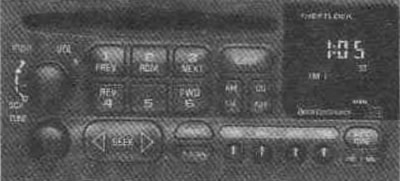
Listening to CDs
PWR: Press this button to turn on the system. Insert a disc into the slot, label side up. The player will pull it in. After a few seconds, the disc will start playing. The CD will appear on the display and the CD symbol will appear.
If the disc comes out again and ERR lights up on the display, this means:
You are driving on a very bumpy road (the disc should be listened to on a smoother road).
The disc is inserted upside down.
The disc is dirty, scratched or wet.
The disk is very wet (if so, wait an hour and try again).
The player is too hot. Press REKALL to remove ERR from the display.
PREV (1): Press PREV or the left SEEK arrow to search for the previous record. If you hold this button or press it more than once, the search continues.
RDM (2): Press this button to play tracks in random order. When the player is in RDM mode, RANDOM appears on the display.
Press RDM again and you will return to normal mode.
NEXT (3): Press this button and the right SEEK arrow to search for the next track. If you hold the button or press it more than once, the search will continue. The numbers of the next tracks will appear on the display.
REV (4): Press and hold REV to quickly return to your favorite song.
You will hear the tunes the disc selects at an accelerated tempo while you hold the REV button. This will give you the opportunity to select the desired tune. Release the button to resume playback.
FWD (6): Press and hold this button to quickly advance through the tracks. You will hear the tunes the disc selects at an accelerated tempo as long as you hold the FWD button. This will give you the opportunity to select the tune you want. Release the button to resume playback.
RECALL: Press this button to see which track is currently playing. Press the button again within 5 seconds to see how long the disc has been playing that track. The time elapsed will appear on the display in minutes and seconds. The track number will also appear on the display when a new track starts playing.
AM-FM: Press this button to stop the CD and turn on the radio. The CD symbol will remain on the display, but the word CD will disappear and AM, FM1 or FM2 will appear instead. (If the radio is turned off and the disc is left in the player, it starts playing the melody from where it stopped).
CD AUX: Press this button to return to CD player operation when the radio is playing.
EJECT: Press this button to eject the disc. When the same disc or another one is inserted again, it starts playing from the first track.
If the CD is in the slot for more than 5 seconds, the player will suck it in. If you leave the CD in the player while listening to the radio, it will heat up.