


Contents: Programming the remote control ↧ Remote control lock system ↧ Unlocking the driver's door only ↧ Unlock all doors - second operation ↧ Locking all doors ↧ Unlocking the tailgate ↧ Alarm signal ↧ Low battery warning in remote… ↧ Indication of a fault or warning ↧ Special tools ↧ Remote control schemes for locks… ↧
Programming the remote control
Important: All transmitters that are to be recognized by the Remote Control Door Lock Receiver (RCDLR) must be programmed in the same programming sequence. If the system is put into programming mode, it will erase all previously programmed transmitters upon receiving a programming signal from the first transmitter. Up to 4 transmitters can be programmed. Do not operate or program transmitters if there are other vehicles nearby that are also in the Remote Control Door Lock Receiver programming mode. This prevents transmitters from being programmed from incompatible vehicles.
1. Install the diagnostic tool.
2. In the main menu of the diagnostic device, select the service programming system, then follow the instructions on the screen.
Important: The diagnostic tool must remain connected until all remotes have been programmed.
3. Simultaneously press and hold the LOCK and UNLOCK buttons on the remote control. After 5 seconds, the diagnostic tool will indicate that the remote control has been programmed.
4. Repeat the previous step to program up to 4 remote controls.
5. Turn off the diagnostic tool.
6. Test the remote control to ensure the system is working properly.
Remote control lock system
The remote control system is an auxiliary device for unlocking a vehicle. The remote control system is used in combination with the door lock key. The system may be affected by radio frequency emissions and low batteries.
The remote control system for locks allows you to control the following devices:
- Door locks including rear compartment
- Entrance lighting lamps
- Alarm signal
The remote control system for locks consists of the following parts:
- Transmitters
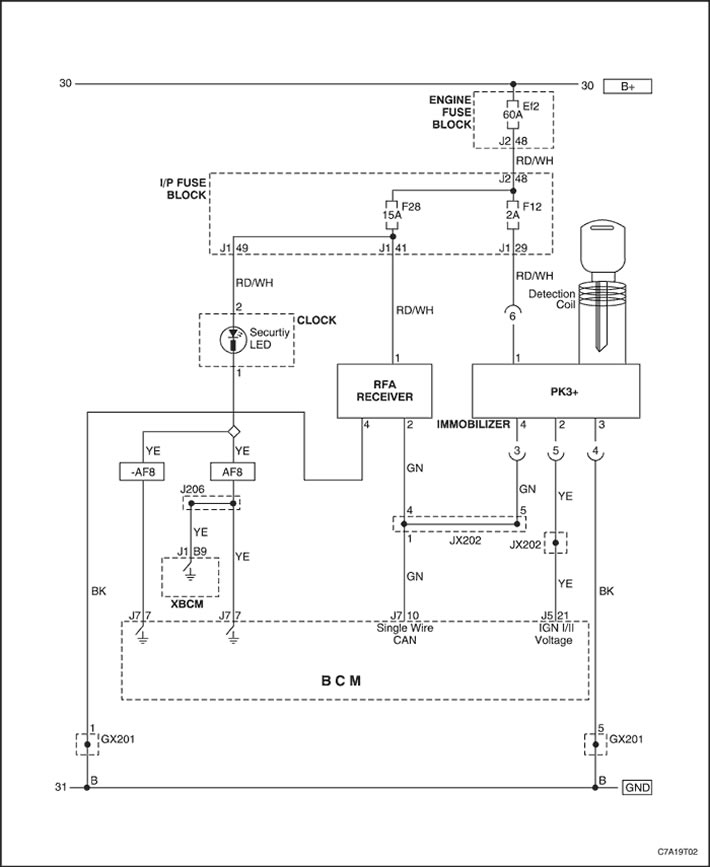
- Remote Control Door Lock Receiver (RCDLR). The RCDLR communicates with the Body Control Module (BCM) via the serial data link of the remote control door lock system. When a button on the remote control is pressed, a signal is sent to the RCDLR receiver. The RCDLR sends a request to the BCM, which carries out the appropriate function.
The RCDLR receiver communicates with the body control module (BCM) via the serial communication line of the remote control locking system. When a button on the remote control is pressed, a signal is sent to the RCDLR receiver. The RCDLR receiver sends a request to the BCM, which carries out the appropriate function.
Unlocking the driver's door only
Press the UNLOCK button briefly to perform the following functions:
- Unlock the driver's door only.
- Turn on the interior lights for a preset time or until the ignition is turned on. The RCDLR receiver communicates with the body control module (BCM) via the serial communication line of the remote control lock system. When a button on the remote control is pressed, a signal is sent to the RCDLR receiver. The RCDLR receiver sends a request to the BCM, which carries out the corresponding function.
- Turn on the parking lights in flashing mode.
Unlock all doors - second operation
Briefly press the UNLOCK button a second time within 2 seconds of the first press to perform the following functions:
- Unlock the remaining doors.
- Turn on the interior lights for a specified time or until the ignition is turned on.
- Turn on the parking lights in flashing mode.
The alarm will also sound if the ignition input signal changes to battery voltage until one of the following conditions occurs:
- UNLOCK message received from transmitter.
- The front door or rear end door control switch indicates key operation.
- The alarm is also activated if the anti-theft function is set on the alarm and the ultrasonic sensor (by separate order) detects movement inside the vehicle before the front door or rear quarter panel control switch has indicated key operation.
Locking all doors
Press the LOCK button to perform the following functions:
- Lock all doors.
- Immediately turn off all interior lights.
- Give a short beep if the LOCK button is pressed a second time within 5 seconds.
Unlocking the tailgate
Press the tailgate release button once to perform the following functions:
- Unlock the rear hatch.
- Turn on the interior lights for a preset time or until the ignition is turned on.
Alarm signal
When you press the panic button, the following functions are performed:
- Turns on interior lights
- Turns on the horn in pulse mode
- Turns on the headlights in flashing mode
- Turns on the parking lights in flashing mode
The alarm continues for a set period of time or until one of the following events occurs:
- The panic button is pressed again.
- The ignition switch is turned to the RUN position with a valid key.
Low battery warning in remote control locks
A warning light will illuminate on the driver information center if the remote control battery is low.
Indication of a fault or warning
The remote keyless entry system uses rolling code technology. Rolling code technology prevents someone from recording a message sent from the remote key and using that message to gain access to the vehicle. The term rolling code refers to the method of sending and receiving signals in the remote keyless entry system. The remote keyless entry system sends a signal in a different order each time. The remote keyless entry system and the RCDLR receiver are synchronized in a specific order. If the programmed remote keyless entry system sends a signal in a different order than the RCDLR receiver expects, the remote keyless entry system has lost synchronization. This occurs after 256 presses of any button on the remote keyless entry system while the vehicle is out of service.
Special tools
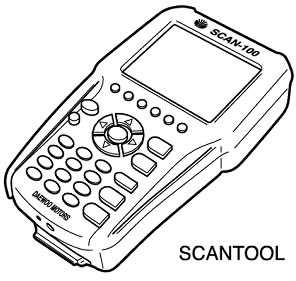
Diagnostic device
Remote control schemes for locks with anti-theft system
(The original article can be found on the resource «ChevyMan»)