
ChevyMan.ru
Mazda Mitsubishi Toyota Land Rover Honda Kia Nissan
English Русский
Български
Беларускі
Український
Српски
Hrvatski
Română
Polski
Slovenský
Magyar
|
Articles | Sitemap | Contacts |


Home   Aveo   Captiva   Cruze   Lacetti   Lanos   Niva   Tahoe   Others  
Tahoe 2 and 3 (2000-2014) Tahoe 1 (1992-2000)
  • Home
  • Tahoe
  • 1 (1992-2000)
  • Chassis
  • Steering
  • Steering gear — removal and installation

Steering gear — removal and installation (Chevrolet Tahoe 1)

            0

Caution! On models equipped with an airbag, do not rotate the steering column shaft with the steering gear removed, otherwise the airbag module will be damaged. After removing the steering gear on these models, secure the steering wheel with the seat belt by passing the belt through the wheel opening and fastening the buckle.


1. Raise the vehicle and place it on stands. Set the parking brake.

2. Place a tray under the steering gear (on models with power steering). Disconnect the hoses from the power steering (see photo).
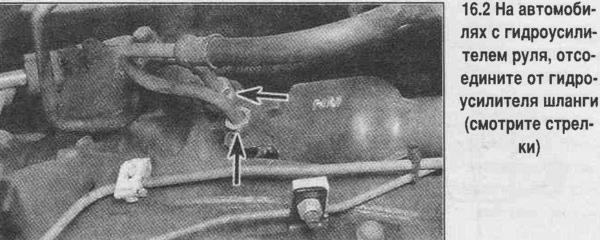
2. Place a tray under the steering gear (on models with power steering). Disconnect the hoses from…


3. On vehicles with power steering, move aside the plastic shield to provide access to the universal joint. Mark the position of the lower universal joint relative to the steering gear shaft. Unscrew the lower intermediate shaft mounting tie bolt (see photo). On vehicles without power steering, move the plastic shield up the intermediate steering shaft, unscrew the adapter nut and remove the washer. Remove the adapter and unscrew the flexible coupling clamp bolt.
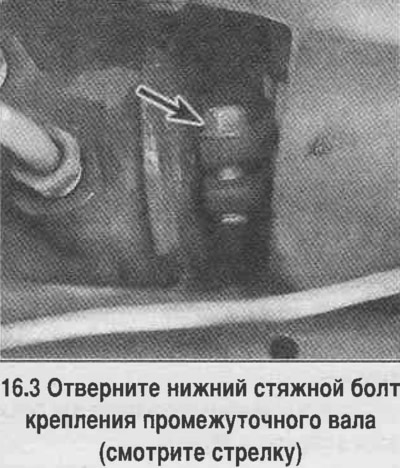
3. On vehicles with power steering, move aside the plastic shield to provide access to the…


4. Mark the position of the bipod on the shaft. Unscrew the bipod nut, remove the washer.


5. Press the bipod off the shaft using a puller.

6. Hold the steering gear and loosen the mounting bolts. Lower the steering gear, separate the intermediate shaft from the steering gear shaft and remove the gear

7. Install the steering gear in place, attach the intermediate shaft, aligning the marks.

8. Place washers on the steering gear mounting bolts and tighten the bolts to the specified torque.

9. Install the bipod on the shaft, aligning the marks. Put on the washer, screw on the nut and tighten the nut to the specified torque.

10. Install the intermediate shaft clamp bolt, tighten the bolt to the specified torque. On a vehicle without power steering, install the adapter, tighten the mounting nut. On all models, install the flexible coupling/universal joint plastic shield in place.

11. Connect the steering rods, connect the hoses to the power steering, fill the fluid into the power steering pump reservoir.

12. Remove the vehicle from the stands.

The article is reprinted from the website: ChevyMan

The article was checked: Vladimir Romannikov
This article is available at russian, bulgarian, belarusian, ukrainian, serbian, croatian, romanian, polish, slovak, hungarian

Share information:

Previous articles
Tahoe 1: Steering
Next articles

Steering rods — inspection, removal and installation
Steering wheel — removal and installation
Tightening torques for connections (Nm)
Power steering pump — removal and installation
Power Steering — Bleeding
Front wheel alignment angles


See similar articles on the topic of Chevrolet cars:
Adjusting the clearance of the gear engagement in the steering mechanism Chevrolet Aveo T250 (2006-2011)
Steering Gear Diagnostic Trouble Codes Chevrolet Captiva 1 (2006-2018)
Replacing the steering gear Chevrolet Cruze 1 (2008-2016)
Replacing the steering gear cover Chevrolet Lacetti 1 (2002-2009)
Removal the steering gear Chevrolet Lanos T150 (2002-2009)
Removal and installation the power steering gear Chevrolet Niva 1 (2002-2016)
Removal and installation the steering gear Chevrolet Lumina 1 (1989-1994)
Link in different formats to this page


Visitor comments

No comments yet


How much will 42 + 34 =


Tahoe 2 and 3 (2000-2014) 
  • General information
  • Vehicle characteristics
  • Vehicle device
  • Manual
  • Maintenance
  • Power unit
  • Engine repair
  • Engine overhaul
  • Cooling system
  • Injection and control system
  • Exhaust system
  • Engine electrical equipment
  • Transmission
  • Automatic gearbox 4L60, 4L65, 4L70
  • Automatic gearbox 6L50, 6L80, 6L90
  • Transfer case
  • Drive shafts and cardan
  • Front drive axle
  • Rear drive axle
  • Chassis
  • Car suspension
  • Steering
  • Brake system
  • Body (until 2007)
  • Exterior (external elements)
  • Interior (internal elements)
  • Doors, locks and windows
  • Heating and air conditioning
  • Security System (SRS)
  • Body (since 2007)
  • Exterior (external elements)
  • Doors, locks and windows
  • Interior (internal elements)
  • Electrical equipment
  • Electrical appliances (until 2007)
  • Lighting and lamps (until 2007)
  • Audio system (until 2007)
  • Electrical appliances (since 2007)
  • Lighting and lamps (since 2007)
  • Audio system (since 2007)
  • Wiring diagrams (2000-2005)
  • Wiring diagrams (2005-2007)
  • Wiring diagrams (since 2007)


Tahoe 1 (1992-2000) 
  • General information
  • User manual
  • Maintenance
  • Power unit
  • Engine in a car
  • Engine removed
  • Cooling system
  • Heating and air conditioning
  • Fuel and exhaust systems
  • Decreased toxicity
  • Transmission
  • Manual gearbox
  • Automatic gearbox
  • Transfer case
  • Clutch and drive shafts
  • Chassis
  • Brake system
  • Car suspension
  • Steering
  • Body
  • Repair of body elements
  • Electrical equipment
  • Engine electrics
  • Equipment and devices
  • Electrical circuits


ChevyMan.ru © 2017-2026 · Mobile version · Feedback · Site search · Interesting to read · Sitemap: EN BG BY UA RS HR RO PL SK HU

Aveo 2003-2008 · Aveo 2006-2011 · Aveo 2012-2018 · Captiva 2006-2018 · Cruze 2008-2016 · Lacetti 2002-2009 · Lanos 2002-2009 · Niva 2002-2016 · Tahoe 1992-2000 · Tahoe 2000-2014 · Lumina 1 1989-1994 · Trailblazer 1 2001-2008 · Orlando 1 2010-2018 ·
🛡️ For your security and to improve our service, this site uses cookies. You can disable them in your browser.