


The following information is displayed on the multifunction display:
- Information messages.
- Individual settings.
- Odometer and trip meter readings.
- Trip computer readings.
- Tire pressure monitoring system readings.
- Engine operation timer.
- Engine oil life.
Switching modes and controlling the operation of the multifunctional display is carried out by pressing the buttons located on the steering wheel.
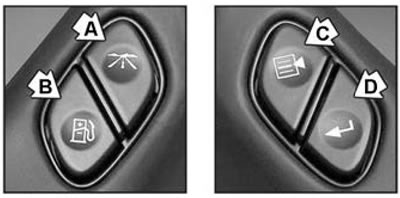
1. Pressing the button (A) alternately displays the odometer, trip meter, tire pressure monitoring system and engine run timer on the multifunction display.
- a) Odometer and trip meters (the display shows the indicator "ODOMETER", "TRIP A" or "TRIP B").
- The odometer shows the total mileage of the vehicle.
- The trip meters show the distance traveled since the last time the meter was reset to zero.
- The odometer is reset by pressing button (A) for a longer period of time when the multifunction display is in odometer mode.
- b) Tire pressure monitoring system indication mode (the display shows the indicator "TIRE PRESSURES"). By pressing the button (D) on the steering wheel it is possible to view the pressure (kPa or psi) in each tire:
- LF TIRE - pressure in the front left tire.
- RF TIRE - pressure in the front right tire.
- LR TIRE - pressure in the rear left tire.
- RR TIRE - rear right tire pressure.
- c) General timer (the display shows "TIMER"). Shows the time since the timer was last set to zero (not including the time at which the ignition was turned off). The timer is reset by pressing and holding the button (A).
- d) Engine operation timer (the display shows the indication "ENGINE HOURS"). Shows the total number of engine operating hours.
2. When you press the button (B), the trip computer readings are displayed sequentially on the multi-function display (the approximate distance the car can travel on the remaining fuel in the tank, the amount of fuel used and the average fuel consumption) and engine oil resource.
- a) Approximate distance the vehicle can travel on the remaining fuel in the tank (the display shows "RANGE"). The display is updated after each refueling and shows the approximate distance the vehicle can travel on the remaining fuel in the tank. When the fuel level is low, the display shows "LOW".
- b) Amount of fuel used (the display shows "FUEL USED"). Shows the amount of fuel used since the last time the counter was set to zero. The counter is reset by pressing and holding the button (B).
- c) Average fuel consumption (the display shows "AVG EcOn"). Displays the average fuel consumption (L/100 km).
- d) Engine oil resource (the display shows the indicator "ENGINE OIL LIFE"). Each time after changing the engine oil, reset this counter to zero by pressing and holding the button (B). If the display shows "100%", then the counter was reset after changing the oil.
3. When you press the button (C), a menu of individual settings is displayed: settings for the conditions for locking/unlocking the doors, settings for the external lighting when locking/unlocking the doors, settings for the conditions for automatically changing the angle of the side rear-view mirrors, conditions for triggering the "buzzer", selection of the language for displaying messages, and selection of units of measurement.
- a) Setting the conditions for automatic door locking (press button (C) until the display shows "LOCK DOORS"). By pressing the button (D) you can view the possible conditions for automatic door locking:
- LOCK DOORS: IN GEAR - automatic door locking when the automatic transmission selector is moved from position "P" to any other.
- LOCK DOORS: WITH SPEED - automatic door locking when the vehicle speed exceeds 8 km/h.
- b) Setting the conditions for automatic door unlocking (press button (C) until the display shows "UNLOCK DOORS"). By pressing the button (D) you can view the possible conditions for automatic door unlocking:
- UNLOCK DOORS: IN PARK - all door locks are automatically unlocked when the automatic transmission selector is moved to the "P" position.
- UNLOCK DRIVER: IN PARK - automatic unlocking of the driver's door lock when the automatic transmission selector is moved to the "P" position.
- UNLOCK DOORS: KEY OUT - automatic unlocking of door locks when the key is removed from the ignition switch.
- UNLOCK DOORS: MANUALLY - automatic unlocking of door locks is not performed.
- c) Turning on/off the door lock delay function (press button (C) until the display shows "DOOR LOCK DELAY"). Pressing the button (D) switches this function on/off:
- DOOR LOCK DELAY: OFF - when the doors are locked using the key or the remote control fob of the central locking system, the doors are locked immediately.
- DOOR LOCK DELAY: ON - when the doors are locked using the key or the remote control fob of the central locking system, the doors are locked automatically for five seconds after all the doors are closed.
- d) Turn on / off the light and sound alarms of the central locking remote control system when the doors are locked (press the button (C) until the display shows "LOCK FEEDBACK"). Pressing the button (D) switches on/off the light or sound signal:
- LOCK FEEDBACK: BOTH - each time the "LOCK" button on the remote control key fob of the central locking system is pressed, a sound signal sounds twice and the side lights flash once.
- LOCK FEEDBACK: LAMPS - each time the "LOCK" button on the remote control key fob of the central locking system is pressed, the side lights flash once.
- LOCK FEEDBACK: HORN - each time the "LOCK" button on the remote control key fob of the central locking system is pressed, a beep sounds twice.
- LOCK FEEDBACK: OFF - when the "LOCK" button on the remote control key fob of the central locking system is pressed, the light and sound alarm of the remote control system of the central locking system do not work.
- d) Switching on/off the light and sound signaling of the remote control central locking system when unlocking the doors (press button (C) until the indication appears on the display "UNLOCK FEEDBACK"). Pressing the button (D) switches on/off the light or sound signal:
- UNLOCK FEEDBACK: BOTH - each time the "UNLOCK" button on the remote control key fob of the central locking system is pressed, a sound signal sounds twice and the side lights flash once.
- UNLOCK FEEDBACK: LAMPS - each time you press the "UNLOCK" button on the remote control key fob of the central locking system, the side lights flash once.
- UNLOCK FEEDBACK: HORN - each time the "UNLOCK" button on the remote control key fob of the central locking system is pressed, a beep sounds twice.
- UNLOCK FEEDBACK: OFF - when the "UNLOCK" button on the remote control key fob of the central locking system is pressed, the light and sound alarm of the remote control central locking system does not work.
- e) Setting the timer for turning off the headlights after turning off the engine (press the button (C) until the display shows "HEADLAMP DELAY"). By pressing the button (D) the delay time is set:
- HEADLAMP DELAY: 10 SEC
- HEADLAMP DELAY: 20 SEC
- HEADLAMP DELAY: 40 SEC
- HEADLAMP DELAY: 1 MIN
- HEADLAMP DELAY: 2 MIN
- HEADLAMP DELAY: 3 MIN
- HEADLAMP DELAY: OFF
- g) Switching on/off the function of remote switching on of external lighting (press the button (C) until the indication appears on the display "PERIMETER LIGHTS"). Pressing the button (D) switches this function on/off:
- PERIMETER LIGHTS: ON - enables the function (in low light conditions, after unlocking the door locks using the "UNLOCK" button on the remote control key fob of the central locking system, the vehicle's external lighting will be turned on for 40 seconds).
- PERIMETER LIGHTS: OFF - disables the function.
- h) Switching the easy exit function on/off (press button (C) until the display shows "EASY EXIT SEAT"). Pressing the button (D) switches this function on/off:
- EASY EXIT SEAT: ON - enables the function (when the key is removed from the ignition, the driver's seat will automatically be set to the easy exit position).
- EASY EXIT SEAT: OFF - disables the function.
- i) Setting the system for changing the angle of the mirror elements of the side rear-view mirrors when parking (press button (C) until the display shows "CURB VIEW"). Pressing button (D) sets the system:
Note: After turning on the system, you must set the position of the mirrors to which they will move when reversing (see the "Mirror Control" section of this chapter).
- CURB VIEW: OFF - the system is turned off.
- CURB VIEW: PASSENGER - when the automatic transmission selector is moved to the "R" position, the mirror element of the passenger rear-view mirror automatically lowers down to improve visibility near the car on the passenger side.
- CURB VIEW: DRIVER - when the automatic transmission selector is moved to the "R" position, the mirror element of the driver's rear-view mirror automatically lowers down to improve visibility near the car from the driver's side.
- CURB VIEW: BOTH - when the automatic transmission selector is moved to the "R" position, the mirror elements of both rear-view mirrors are lowered.
- k) Turning on/off the light and sound alarm of the anti-theft system (press button (C) until the indication appears on the display "ALARM WARNING"). Pressing the button (D) switches on/off the light or sound signal:
- ALARM WARNING: BOTH - when the anti-theft system is activated, a sound signal sounds and the side lights flash once.
- ALARM WARNING: OFF - when the anti-theft system is activated, the sound and light alarms do not work.
- ALARM WARNING: HORN - when the anti-theft system is activated, a sound signal is heard.
- ALARM WARNING: LAMPS - when the anti-theft system is activated, a sound is heard once and the side lights flash.
- l) Selecting the language of the multi-function display (press button (C) until "LANGUAGE" appears on the display). Pressing button (D) selects the language.
- ENGLISH - English.
- FRANCAIS - French. ESPANOL - Spanish.
Note: If you accidentally select the wrong language for the multifunction display, press and hold the (C) button and the (A) button simultaneously to quickly enter the language selection mode, and the display will alternately display the language names. When the desired language name is displayed, release the (C) and (A) buttons.
- m) Selecting the units of measurement of the trip computer (press the button (C) until the indication appears on the display "DISPLAY UNITS"). By pressing the button (D) you can select units of measurement:
- DISPLAY UNITS: ENGLISH - English system of measurements.
- DISPLAY UNITS: METRIC - metric system of measurements.
Informational messages
Possible information messages and explanations for them are provided in the table "Information messages of the DIC system multifunction display".
Note:
- Information messages are displayed when certain conditions occur, regardless of the operating mode of the multifunction display.
- If there are multiple information messages, they are displayed one after the other.
- To remove the information message from the multifunction display, press any DIC button on the steering wheel. The message will be removed if the reason for its appearance does not require immediate action, but this does not mean that the reason has been eliminated.
- An information message, the reason for which requires immediate action, cannot be removed.
Table: Information messages of the DIC system multifunction display
| Information message on the display | Buzzer | Cause of occurrence | Method of elimination |
| BATTERY NOT CHARGING | (Modifications) The message appears if the battery is not charging. Further driving will result in the battery being completely discharged | Perform diagnostics at a car repair shop | |
| BUCKLE PASSENGER | Sounds intermittent | (Models with seat occupancy detection system) The message appears if the passenger seat belt is not fastened when the vehicle is driven and the passenger airbag is on | Fasten the passenger seat belt |
| BUCKLE SEATBELT | Sounds intermittent | The message appears if the driver's seat belt is not fastened when starting the movement | Fasten the driver's seat belt |
| CHANGE ENGINE OIL | The message appears when it is necessary to change the engine oil and undergo maintenance | Note: To clear the message, follow the steps described in "Multifunction Display (dIC system)" | |
| CHARGING SYSTEM FAILURE | Sounds intermittent | (Modifications) The message appears if the charging system is faulty. Further driving will result in the battery being completely discharged | See the section "Instrument cluster indicators" |
| CHECK OIL LEVEL | The message appears when the engine oil level is low | Bring the engine oil level up to normal. Note: The message will disappear automatically after 10 seconds and will be displayed every time the ignition is turned on until the oil level is brought to the norm | |
| CHECK TIRE PRESSURE | Sounds intermittent | The message appears when the tire pressure is low | See the section "Tire Pressure Monitoring System" |
| CHECK WASHER FLUID | The message appears when the windshield washer fluid level is low | Add washer fluid. Note: The message will disappear automatically after 10 seconds and will be displayed every time the ignition is turned on | |
| DRIVER DOOR AJAR | Sounds intermittent | The message appears if the driver's door is open or not fully closed when the automatic transmission selector is moved to position "D" or "N" | Close the driver's door |
| ENGINE COOLANT HOT | The message appears when the coolant temperature is high | Turn off the air conditioner. If the coolant temperature continues to rise, stop the car in a safe place, move the automatic transmission selector to the "P" position and wait until the coolant temperature drops to the operating value | |
| ENGINE OVERHEATED | Sounds intermittent | The message appears when the engine overheats | See the subsection "Engine overheating" in the section "Engine malfunctions while driving" of this chapter. Warning: Continuing to drive the vehicle when the engine is overheated will result in engine failure |
| FUEL LEVEL LOW | Sounds intermittent | The message appears when the fuel level is low | Fill the car with fuel. Note: The message will disappear automatically after 10 seconds and will be displayed every time the ignition is turned on |
| KEYFOB X BATTERY LOW | The message appears if the battery in the remote control key fob of the central locking system is discharged | Replace the battery in the remote control key fob of the central locking system | |
| LEFT REAR DOOR AJAR | Sounds intermittent | The message appears if the rear left door is open or not fully closed when the automatic transmission selector is moved to position "D" or "N" | Close the rear left door |
| (Chevrolet Tahoe, Avalanche) LOW COOLANT LEVEL | The message appears when the coolant level is low | Bring the coolant level up to normal | |
| OIL LIFE RESET | - | Message appears after deleting message "CHANGE ENGINE OIL" | - |
| OIL PRESSURE LOW | Sounds intermittent | The message appears when the engine oil pressure is low | Stop the vehicle immediately and eliminate the cause of the drop in engine oil pressure. Warning: Driving with low engine oil pressure will cause engine failure |
| PASSENGER DOOR AJAR | Sounds intermittent | The message appears if the passenger door is open or not fully closed when the automatic transmission selector is moved to position "D" or "N" | Close the passenger door |
| REAR ACCESS OPEN | Sounds intermittent | The message appears if the rear door is open or not closed properly when the ignition key is turned to the "START" position | Close the back door |
| REDUCED ENGINE POWER | Sounds intermittent | The message appears if the engine is running in safe mode due to high coolant temperature. Note: This message may also appear if a fault is detected in the throttle control system | See the subsection "Engine overheating" in the section "Engine malfunctions while driving" of this chapter |
| REPLACE LIFTGATE FUSE | The message appears when a fault is detected in the rear door lock actuator and/or when the fuse in the rear door lock actuator circuit has blown | Replace the rear door lock actuator circuit fuse or repair the actuator | |
| RIGHT REAR DOOR AJAR | Sounds intermittent | The message appears if the rear right door is open or not fully closed when the automatic transmission selector is moved to position "D" or "N" | Close the rear right door |
| SERVICE 4WD | The message appears when a fault is detected in the all-wheel drive control system | Stop the vehicle immediately in a safe place, then turn the ignition off and on. If the message appears again after turning the ignition on or while driving, the 4WD control system is faulty. Contact your dealer to have the fault corrected | |
| (Chevrolet Tahoe) SERVICE 4 WHEEL STEER | The message appears when a fault is detected in the 4WS system | Stop the vehicle immediately in a safe place, then turn the ignition off and on. If the message appears again after turning the ignition on or while driving, the 4WS system is faulty. Contact your dealer to have the fault corrected | |
| SERVICE AIR BAG | - | The message appears when a malfunction is detected in the SRS system | Have the SRS system checked by your dealer |
| SERVICE BRAKE SYSTEM | The message appears when a fault is detected in the brake system | Stop the vehicle immediately in a safe place, then turn the ignition off and on. If the message appears again after turning the ignition on or while driving, the brake system is faulty. Contact your dealer to have the fault corrected | |
| SERVICE CHARGING SYSTEM | (Modifications) The message appears when a fault is detected in the charging system. Due to insufficient battery charge, the engine cannot operate in fuel economy mode | Contact your dealer to correct the problem | |
| SERVICE RIDE CONTROL | The message appears when a fault is detected in the suspension control system | Stop the vehicle in a safe place, then turn the ignition off and on. If the message appears again after turning the ignition on or while driving, the suspension control system is faulty. Contact your dealer to have the fault corrected | |
| SERVICE STABILITY | The message appears when a fault is detected in the electronic stability control system (StabiliTrak) | Stop the vehicle, turn the engine off and on again. If the message appears again when the engine is started, this indicates a fault in the stability control system (StabiliTrak). Contact your dealer to correct the problem | |
| SERVICE TIRE MONITOR | The message appears when there is a malfunction in the tire pressure monitoring system sensors | Contact your dealer to correct the problem | |
| STABILITY SYS ACTIVE | The message appears when the stability control system is activated (StabiliTrak) | See the section "StabiliTrak System" | |
| STABILITY SYS DISABLED | The message appears after: 1. Forced disabling of the stability control system by pressing the system switch. 2. Automatic deactivation of the stability control system (prolonged system operation, brake system malfunction, engine management system malfunction, or extended system self-diagnosis time) | The message will disappear after the cause of its appearance is eliminated | |
| TIGHTEN FUEL CAP | The message appears if the fuel filler cap is not completely closed | Screw the fuel tank filler cap on completely. Note: The message will go away after a few trips. | |
| TRACTION ACTIVE | The message appears in case of wheel slippage and the traction control system is activated | See the section "StabiliTrak System" | |
| TRACTION SYS LIMITED | - | The message appears when the brake mechanisms overheat | Wait until the brakes cool down |
| TRANS HOT IDLE ENGINE | Sounds intermittent | The message appears when the automatic transmission fluid overheats | Stop the vehicle and let the engine idle until the message goes out Warning: Driving a car with a high temperature of the automatic transmission fluid will lead to automatic transmission failure |
| TRANSMISSION HOT | The message appears when the temperature of the automatic transmission fluid increases | When this message appears, the automatic transmission control system switches to a safe operating mode (see the section "Driving a car with an automatic transmission") | |
| TURN SIGNAL ON | Sounds intermittent | The message appears if the direction indicator remains on for more than 1.2 km | Turn off the turn signal |