


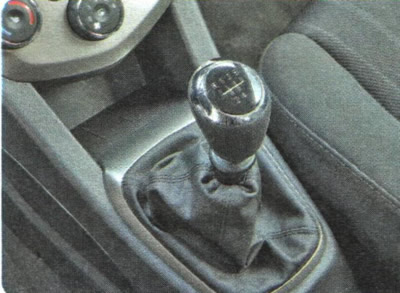
Manual transmission operate according to the shift pattern printed on the handle of its lever. In the neutral position, the lever is automatically set to the position for engaging III or IV gear, from which it can be moved forward or backward, respectively. To engage I or II gear, move the lever to the left as far as it will go and then forward or backward, respectively. To engage V gear, move the lever to the right as far as it will go and forward.
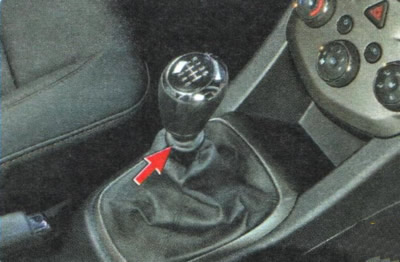
To engage reverse gear, lift the locking ring up (shown in the photo by an arrow), move the lever to the left until it stops, and then forward.
Automatic transmission has six forward gears and one reverse gear. Each gear is engaged automatically depending on the position of the gear selector lever, vehicle speed and accelerator pedal position.
NOTE: During the break-in period of a new vehicle or immediately after connecting the battery (after it is disconnected or replaced) gear shifting may not be as smooth as usual. This does not indicate a malfunction: after a few automatic gear shifts, the shifting process will become smooth.
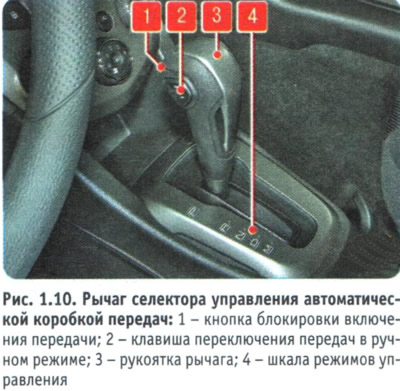
In addition to the automatic control mode, there is also a manual mode, in which the driver can quickly change gears by pressing the upper or lower edge of the key 2 (figure 1.10).
NOTE: Unlike a manual transmission, an automatic transmission, when in manual mode, allows the driver to change gears without releasing the accelerator pedal.
The selector lever is located on the floor tunnel in the same place as the manual gearbox control lever. The floor tunnel trim has a scale of 4 control modes. On the handle 3 of the lever there is a button 1 for blocking the inclusion of an inappropriate gear in automatic mode and a button 2 for shifting gears in manual mode.
The control mode scale is marked with the following symbols:
R (parking). In this position, the gearbox is locked to prevent the parked vehicle from moving. If the selector lever is in this position, the engine can be started;
R (reverse). Move the lever to this position only after the car has come to a complete stop;
WARNING: Never move the selector lever to the "P" (Park) or "R" position (reverse) while the car is moving! This will cause damage to the gearbox.
N (neutral). In this position of the lever, no gear is engaged in the gearbox. This position is used during long stops (for example, in traffic jams);
WARNING: Never move the selector lever to the "N" (neutral) position while driving! This could accidentally move the lever to the "P" (park) or "R" position (reverse), which will lead to gearbox failure. In addition, engine braking will become impossible.
USEFUL TIPS: To avoid losing control of the vehicle, always keep your foot on the brake pedal when the lever is in the "N" (neutral) position and when moving the lever into this position.
If the vehicle is on a slope, when starting the engine, the selector lever must be set to position "P" (parking), not "N" (neutral).
D (forward movement). This is the main position of the selector lever, in which it remains most of the time while driving. In this case, the automatic transmission selects the gear that is optimal for the given speed and acceleration of the car. When driving on a steep descent, a lower gear may be automatically engaged to provide more effective engine braking;
M (manual control mode). In this position of the selector lever, the driver independently changes gears by successively pressing the upper edge of button 2 (upshifting) or on its lower edge (downshifting).
To move the selector lever from the "P" (park) position to the "R" position (reverse) press the lock button 1 located on the handle 3 of the lever, while simultaneously pressing the brake pedal.
NOTE: A special locking device will not allow the selector lever to be moved from the "P" (Park) position to any other position unless the brake pedal is held depressed.
To further move the lever to the "N" (neutral) and "D" positions (forward movement) you do not need to press the lock button. To move the lever back from position "D" to position "N" you do not need to press the lock button, and to move the lever further to position "I" (reverse) and "P" (parking) button should be pressed. To move the lever to the "M" position (manual control mode) press the lock button. To move the lever back from the "M" position (manual control mode) to position "D" (forward movement) there is no need to press the lock button.
WARNINGS: Do not press the lock button each time you move the selector lever from one position to another. This will become a habit and you may move the lever to the "P" (Park) or "R" position (reverse) while the vehicle is moving, which will lead to gearbox failure.
When starting to move, do not press the accelerator pedal when moving the selector lever from the "P" (park) or "N" (neutral) position to any other position. This is dangerous, as the car may suddenly move forward or backward.
When the ignition is on, the selector position indicator appears on the instrument cluster display (automatic switching mode) or the number of the gear engaged (manual switching mode).
Whether the vehicle is moving or stationary, to select manual shift mode, move the selector lever from the "D" position (forward movement) to position "M" (manual control mode) to activate manual gear shifting mode. In manual gear shifting mode, you can quickly shift gears by pressing the upper or lower edges of key 2 without releasing the accelerator pedal.
To shift into a higher gear, press the top edge of the key marked with the "+" sign and release the key. To shift into a lower gear, press the bottom edge of the key marked with the "-" sign and release it.
WARNING: In manual transmission mode, upshifting does not occur automatically. The driver must independently determine the moment of upshifting in accordance with road conditions. In this case, it is necessary to ensure that the engine speed does not exceed the maximum permissible value (the tachometer needle did not enter the red zone of the scale).
NOTE: In manual transmission mode, only one of the six forward gears can be selected. To reverse or park, move the selector lever forward to automatic mode and then to the "R" position (reverse) or "P" (parking), respectively.
In order to ensure the necessary traction and dynamic characteristics and safety of the vehicle, the automatic transmission may not shift to a higher gear when the vehicle speed is insufficient, even if the driver presses the edge of the key marked with the "+" sign. Similarly, the transmission may not shift to a lower gear when the vehicle speed is high, even if the driver presses the lower edge of the key marked with the "-" sign, to prevent excessive increase in engine speed.
In manual transmission control mode, when the vehicle speed decreases, downshifting occurs automatically. When the vehicle stops, 1st gear is automatically engaged. Move the selector lever smoothly, without excessive force. Sharp and strong movements can damage the lever.
If the battery is discharged or the electrical equipment is faulty, perform the following operations to unlock the automatic transmission (move the selector lever from the "P" position).
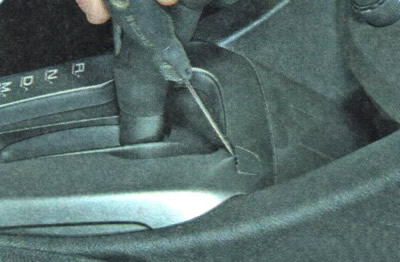
1. Using a flat-blade screwdriver, pry...
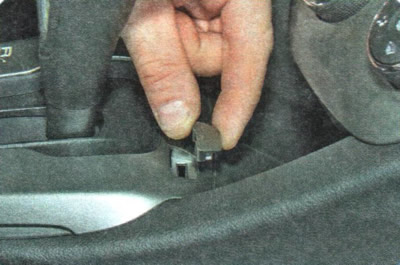
2. ... remove the plug from the hole in the selector linkage trim.
3. Press and hold the brake pedal.
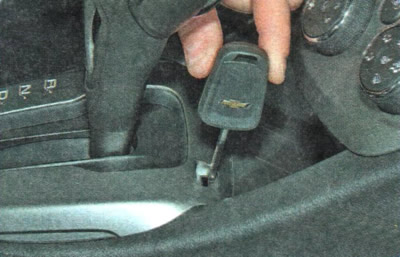
4. Insert the key for the lock into the hole in the door panel trim (switch) ignition (or a screwdriver)...
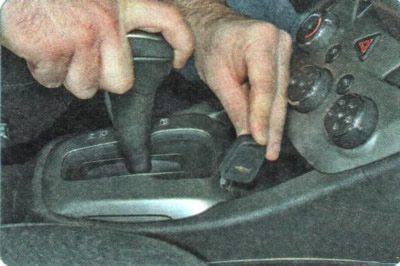
5. ...press the release lever downwards and move the selector lever from position "P", for example, to position "0" or "N", by pressing button 1 (see figure 1.10) blocking.
6. Contact an authorized Chevrolet dealer to have the locking system checked.
(The text of the article was obtained from the website: «ChevyMan.ru»)